
Office Administrator Resume Template: ATS Examples & Writing Guide [2025]
Landing an office administrator role in 2025 requires more than just listing your daily tasks. You need a resume that demonstrates your ability to streamline operations, reduce costs, and keep an entire office running smoothly.
Here’s the challenge: most office administrator resumes look exactly the same. They list generic responsibilities like “answered phones” and “managed files” without showing the real impact. Meanwhile, hiring managers are drowning in applications and need to see concrete results fast.
By the end of this article, you’ll have a complete understanding of how to craft an office administrator resume that showcases your organizational expertise and gets you interviews. We’ll walk you through every section with proven examples, plus you’ll get access to free downloadable templates that follow current ATS best practices.
Ready to build a resume that actually stands out? Let’s get started.
☑️ Key Takeaways
- Quantify your impact with specific metrics like “reduced costs by 20%” or “managed 50+ meetings monthly” to stand out from generic applications
- ATS optimization is critical since 83% of companies now use automated screening that filters resumes based on keywords from job descriptions
- Professional summary matters most as hiring managers spend just 6 seconds initially scanning your resume before deciding to continue reading
- Core skills section drives results when organized by category and includes both technical proficiencies and soft skills relevant to office administration
What Makes an Office Administrator Resume Different?
Office administrators are the operational backbone of any organization. Your resume needs to reflect that critical role by demonstrating how you’ve improved efficiency, saved money, and solved problems that others didn’t even notice existed.
The biggest mistake candidates make is treating their resume like a job description. Hiring managers don’t care what you were responsible for. They care about what you actually accomplished.
For example, instead of writing “Managed office supplies,” write “Reduced office supply costs by 20% through strategic vendor negotiations and just-in-time inventory system.” See the difference? One shows tasks, the other shows impact.
In 2025, office administrator roles have evolved significantly. You’re expected to be proficient with cloud-based tools, comfortable with remote work coordination, and skilled at managing hybrid workplace logistics. Your resume needs to reflect these modern competencies while still highlighting timeless organizational skills.
Interview Guys Tip: The most successful office administrator resumes follow a specific format that puts your professional summary and core skills near the top where ATS systems scan first. This strategic placement dramatically increases your chances of passing automated screening.
Office Administrator Resume Example
Here’s a professional retail resume example. This example gives you an idea of what type of content fits in a good ATS friendly resume.
Example Resume:
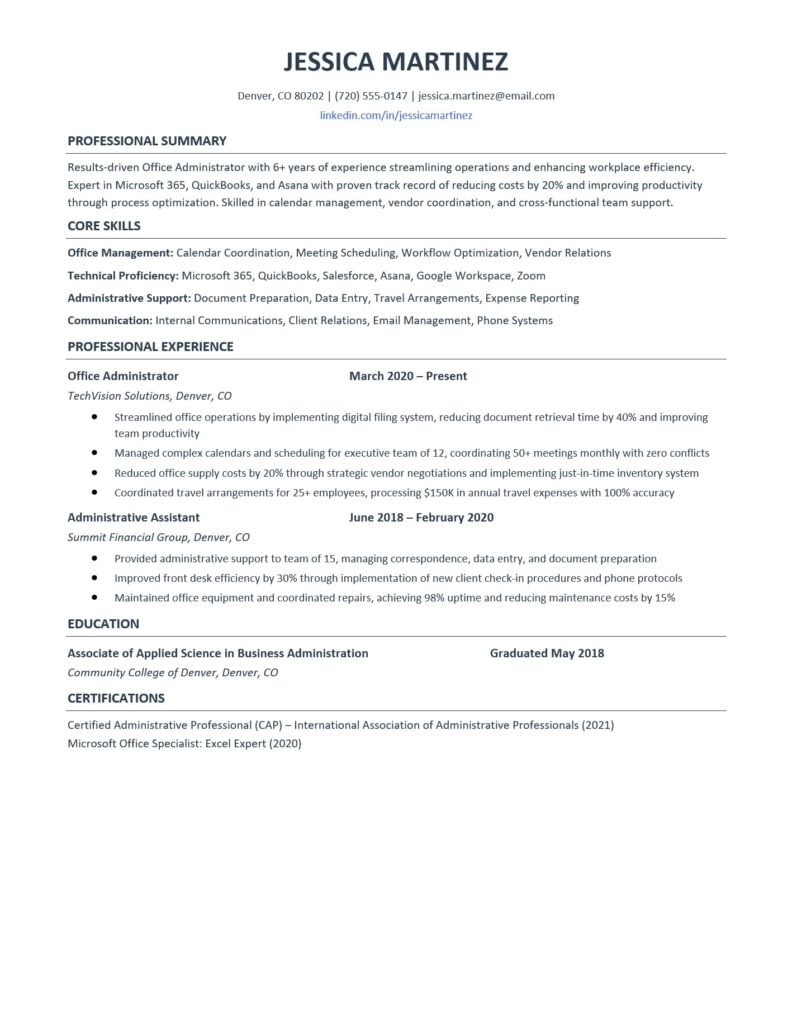
Here’s a professional Office Administrator Resume Template you can download and customize. This template is designed to be both visually appealing and ATS-friendly, with clean formatting that highlights your strengths.
Blank Customizable Template
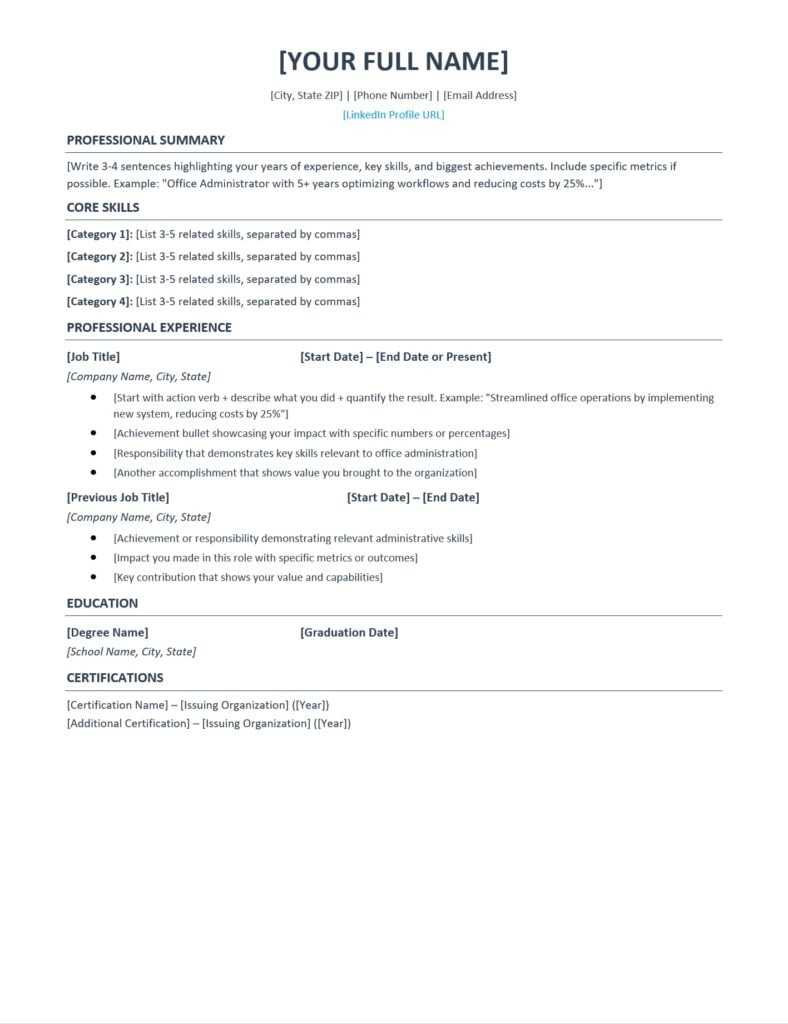
Download Your Free Template:
- Download DOCX Template (fully editable in Microsoft Word)
Interview Guys Tip: The DOCX template is fully editable, allowing you to adjust fonts, colors, and spacing to match your personal brand while maintaining professional formatting. Just replace the placeholder text with your own information.
Here’s what most people don’t realize: employers now expect multiple technical competencies, not just one specialization. The days of being “just a marketer” or “just an analyst” are over. You need AI skills, project management, data literacy, and more. Building that skill stack one $49 course at a time is expensive and slow. That’s why unlimited access makes sense:
Your Resume Needs Multiple Certificates. Here’s How to Get Them All…
We recommend Coursera Plus because it gives you unlimited access to 7,000+ courses and certificates from Google, IBM, Meta, and top universities. Build AI, data, marketing, and management skills for one annual fee. Free trial to start, and you can complete multiple certificates while others finish one.
Essential Resume Components for Office Administrators
Your office administrator resume should include these critical sections in this specific order:
- Professional Summary comes first after your contact information. This 3-4 sentence paragraph highlights your years of experience, key technical skills, and most impressive quantifiable achievements. It’s your elevator pitch in written form.
- Core Skills appears next and should be organized into 4-5 categories. Think office management, technical proficiency, administrative support, and communication. Understanding which skills to highlight can make or break your application.
- Professional Experience forms the heart of your resume. List jobs in reverse chronological order with 3-5 bullet points per position. Each bullet should start with a strong action verb and include specific metrics whenever possible.
- Education typically comes after experience unless you’re a recent graduate. Include your degree, school name, location, and graduation date. You don’t need to include your GPA unless it’s exceptionally high.
- Certifications can significantly boost your candidacy. Credentials like Certified Administrative Professional (CAP) or Microsoft Office Specialist show commitment to professional development.
How to Write Your Professional Summary
Your professional summary is prime real estate on your resume. Hiring managers make their initial decision within 6 seconds of looking at your resume, and your summary is what they read first.
Start with your job title and years of experience. Then immediately jump into your biggest achievement with a specific number. Follow with 2-3 key technical skills that match the job description.
Here’s a strong example: “Results-driven Office Administrator with 6+ years of experience streamlining operations and enhancing workplace efficiency. Expert in Microsoft 365, QuickBooks, and Asana with proven track record of reducing costs by 20% and improving productivity through process optimization.”
Avoid vague statements like “hardworking professional seeking challenging position.” These generic phrases waste valuable space and don’t differentiate you from other candidates.
Tailor your summary for each application by incorporating keywords from the job posting. If the position emphasizes “vendor management,” make sure that phrase appears in your summary if it accurately reflects your experience.
Crafting Your Core Skills Section
The core skills section is where ATS systems do their heaviest scanning. Mastering resume formatting ensures these skills are properly recognized by automated systems.
Organize skills into logical categories rather than creating one long list. This makes your resume more scannable for human readers while still including all necessary keywords for ATS.
Use categories like:
- Office Management: Calendar coordination, meeting scheduling, workflow optimization, vendor relations
- Technical Proficiency: Microsoft 365, QuickBooks, Salesforce, Asana, Google Workspace
- Administrative Support: Document preparation, data entry, travel arrangements, expense reporting
- Communication: Internal communications, client relations, email management
Notice how each category balances hard skills (specific software) with soft skills (communication abilities). This combination shows you’re both technically capable and interpersonally effective.
Always match skills to the job description. If a posting mentions “proficiency in Salesforce,” make sure that exact term appears in your skills section if you have that experience.
Interview Guys Tip: Don’t just list skills randomly. Order them strategically with the most relevant (and most frequently requested in job postings) appearing first in each category. ATS systems often weight skills differently based on placement.
Writing Powerful Experience Bullets
Your experience bullets make or break your resume. This is where you transform boring task lists into compelling achievement statements that prove your value.
Every bullet should follow this formula: Action Verb + What You Did + Quantifiable Result
Weak bullet: “Responsible for managing office supplies”
Strong bullet: “Reduced office supply costs by 20% through strategic vendor negotiations and implementing just-in-time inventory system”
The difference is dramatic. The strong bullet shows initiative, problem-solving, and measurable impact. It tells a story about how you identified an issue and fixed it.
Common metrics for office administrators include:
- Percentage of cost reduction
- Number of calendars managed
- Meeting volume coordinated
- Time savings achieved
- Accuracy rates
- Team size supported
- Budget amounts handled
If you struggle to quantify achievements, think about before-and-after scenarios. How did the office operate before you implemented a new system? How much better did it run afterward? That’s your metric.
Use strong action verbs like streamlined, implemented, coordinated, reduced, improved, and managed. Avoid passive language like “responsible for” or “duties included.”
Education and Certification Strategy
For office administrators, relevant experience typically outweighs education. However, your education section still matters for ATS screening and demonstrating foundational knowledge.
Include your degree name, school, location, and graduation date. If you graduated more than 10 years ago, you can omit the year to avoid potential age discrimination.
Certifications deserve special attention because they differentiate you from candidates with similar experience. According to labor market data, administrative professionals with specialized certifications earn higher salaries and advance faster.
Top certifications for office administrators include:
- Certified Administrative Professional (CAP)
- Microsoft Office Specialist (MOS)
- Microsoft 365 Certified: Modern Desktop Administrator
- Project Management Professional (PMP)
- Notary Public
Place certifications in a dedicated section after education. Include the credential name, issuing organization, and year earned. If a certification is particularly relevant to the position, you can also mention it in your professional summary.
ATS Optimization and Keywords
Here’s a reality check: 83% of companies now use applicant tracking systems to screen resumes before human eyes ever see them. If your resume isn’t optimized for ATS, it’s getting rejected automatically regardless of your qualifications.
ATS systems scan for specific keywords from the job description. They’re looking for exact matches to skills, software, and responsibilities mentioned in the posting. Small differences in phrasing matter tremendously.
For example, if the job description says “calendar management” but your resume says “scheduling,” the ATS might not recognize the match. Always use the exact phrasing from the posting when it accurately describes your experience.
Key ATS strategies:
- Mirror the exact job title from the posting
- Use standard section headings (Professional Experience, not Work History)
- Avoid tables, text boxes, and graphics that confuse ATS
- Save as .docx format unless otherwise specified
- Include full spellings before abbreviations (Microsoft Office Suite before MS Office)
Common office administrator keywords include: administrative support, calendar management, office coordination, vendor relations, data entry, Microsoft 365, travel arrangements, expense reporting, document preparation, and meeting coordination.
Don’t keyword stuff by randomly inserting terms. Understanding how to list skills on a resume properly ensures natural integration that satisfies both ATS and human readers.
Interview Guys Tip: Before you submit another application, run your resume through an ATS scanner. Most job seekers skip this step and wonder why they never hear back. Check out the free ATS checker we use and recommend →
Common Mistakes to Avoid
Even experienced candidates make critical resume mistakes that cost them interviews. Here are the most common pitfalls and how to avoid them.
- Generic statements without metrics. Saying you “managed office operations” tells hiring managers nothing. Quantify everything possible. How many people did you support? What budget did you manage? What improvements did you implement?
- Outdated skills. Listing “fax machine operation” or “10-key data entry” dates you unnecessarily. Focus on current technologies like cloud collaboration tools, project management software, and modern communication platforms.
- Passive language. Phrases like “responsible for” and “duties included” are resume killers. They show tasks, not achievements. Use active verbs that demonstrate initiative and impact.
- Length issues. Office administrator resumes should be one page for candidates with less than 10 years of experience, two pages maximum for senior professionals. Anything longer gets immediately discarded.
- Missing contact information. It sounds obvious, but candidates sometimes omit phone numbers or use unprofessional email addresses. Use firstname.lastname@email.com format and include city/state (full address not necessary).
- Ignoring the job description. Sending the same generic resume to every application is a guaranteed way to get rejected. Spend 15 minutes customizing your resume for each position by adjusting keywords and highlighting most relevant experience.
- Unexplained employment gaps. If you have gaps, address them briefly in your cover letter or with a single line in your experience section (e.g., “Career break for family caregiving”). Don’t leave hiring managers guessing.
Preparing for the Interview
Once your stellar resume lands you an interview, preparation becomes critical. Office administrator interviews typically focus on organizational skills, problem-solving abilities, and cultural fit.
Expect questions about how you handle multiple priorities, manage difficult situations, and stay organized under pressure. The best way to prepare is using the SOAR Method (Situation, Obstacle, Action, Result) rather than the outdated STAR framework. Learn more about answering behavioral questions effectively to ace your interview.
Research the company thoroughly. Understand their industry, recent news, and organizational structure. Be prepared to discuss how your specific administrative experience aligns with their needs.
Prepare thoughtful questions to ask interviewers. Asking smart questions demonstrates genuine interest and helps you evaluate if the role is right for you.
When discussing your experience, always connect it back to results. Don’t just say you managed calendars, explain how your calendar management system prevented scheduling conflicts and improved meeting efficiency by a specific percentage.
If you’re specifically applying for office administrator roles, review common office administrator interview questions to ensure you’re fully prepared.
FAQ
How long should an office administrator resume be?
One page for professionals with less than 10 years of experience, maximum two pages for senior administrators. Hiring managers spend an average of 6 seconds on initial resume scans, so concise and impactful content matters more than length.
Should I include a photo on my resume?
No. Unless specifically requested or you’re applying internationally where photos are standard, omit them. Photos can introduce unconscious bias and aren’t expected in U.S. applications.
How many jobs should I list?
Include your last 10-15 years of relevant experience, typically 3-5 positions. Older roles can be condensed into an “Earlier Experience” section with just titles and companies listed. Focus detail on your most recent and relevant positions.
What if I don’t have specific metrics to include?
Estimate conservatively. If you managed “several” calendars, research industry standards and use a realistic number like 10-15. If you improved efficiency but don’t have exact percentages, estimate based on time saved or processes streamlined. Rough metrics beat no metrics.
Should I include references on my resume?
No. The phrase “references available upon request” is outdated and wastes space. Prepare a separate reference sheet to provide when specifically requested during later interview stages.
Ready to Land Your Next Role?
You now have everything you need to create an office administrator resume that gets results. Remember these key principles: quantify your achievements, optimize for ATS, tailor for each application, and focus on impact rather than tasks.
Download your free templates above and start building your resume today. Take the time to customize it properly for each application rather than sending the same generic version everywhere.
Want more resume templates for different roles? Browse our complete free resume template library for additional options and industry-specific guidance.
Your next career opportunity is waiting. Now go make it happen.
Here’s what most people don’t realize: employers now expect multiple technical competencies, not just one specialization. The days of being “just a marketer” or “just an analyst” are over. You need AI skills, project management, data literacy, and more. Building that skill stack one $49 course at a time is expensive and slow. That’s why unlimited access makes sense:
Your Resume Needs Multiple Certificates. Here’s How to Get Them All…
We recommend Coursera Plus because it gives you unlimited access to 7,000+ courses and certificates from Google, IBM, Meta, and top universities. Build AI, data, marketing, and management skills for one annual fee. Free trial to start, and you can complete multiple certificates while others finish one.

BY THE INTERVIEW GUYS (JEFF GILLIS & MIKE SIMPSON)
Mike Simpson: The authoritative voice on job interviews and careers, providing practical advice to job seekers around the world for over 12 years.
Jeff Gillis: The technical expert behind The Interview Guys, developing innovative tools and conducting deep research on hiring trends and the job market as a whole.