
Free ATS Resume Template 2025: Examples & Complete Guide
You’ve spent hours perfecting your resume, hit submit on that dream job, and then… crickets. Sound familiar?
Here’s what probably happened. Your resume never made it past the company’s Applicant Tracking System. These software platforms scan and filter applications before any human sees them, and they’re incredibly common.
Over 98% of Fortune 500 companies use ATS to manage their hiring process. Even smaller businesses are jumping on board. The result? Your beautifully designed resume with creative fonts and fancy graphics might look great to you but appears as gibberish to the robots screening applications.
That’s the bad news. The good news? You don’t need expensive software or a professional resume writer to beat these systems.
In this guide, we’re giving you a completely free, ATS-friendly resume template that’s proven to work in 2025, plus everything you need to know about filling it out strategically. By the end of this article, you’ll have a downloadable template and the knowledge to customize it for any job you’re pursuing.
☑️ Key Takeaways
- 75% of resumes get rejected by ATS software before a human ever sees them, making an ATS-optimized template essential for 2025
- Our free template uses proven formatting with standard section headers, single-column layout, and simple fonts that ATS systems read perfectly
- Both example and blank versions included so you can see exactly how to fill yours out with achievement-focused bullet points
- Tailoring your resume with job description keywords can increase your interview chances by up to 3.5 times
What Makes an ATS-Friendly Resume Different?
ATS software doesn’t “read” your resume the way humans do. Instead, it parses the content, converting everything into a text-only format it can analyze.
The biggest culprits for ATS failures? Tables, text boxes, headers and footers with critical information, columns, images, and graphics. These design elements might look professional, but they confuse ATS software. The result is a resume that either gets rejected outright or has your information scrambled beyond recognition.
An ATS-friendly resume template solves this by using a clean, single-column layout with standard formatting. No fancy tricks, just clear structure the software can parse correctly.
Your template also needs standard section headers that ATS systems recognize instantly. When the software looks for your work experience, it expects to see headers like “Professional Experience” or “Work Experience,” not creative alternatives like “My Journey.”
Interview Guys Tip: Don’t sacrifice readability for human reviewers while optimizing for ATS. Once your resume passes the initial screening, an actual person needs to be impressed. Our template balances both needs perfectly.
ATS Friendly Resume Example
Here’s a professional resume example. This example gives you an idea of what type of content fits in a good ATS friendly resume.
Example Resume:

Here’s a professional resume template you can download and customize. This template is designed to be both visually appealing and ATS-friendly, with clean formatting that highlights your strengths.
Blank Customizable Template
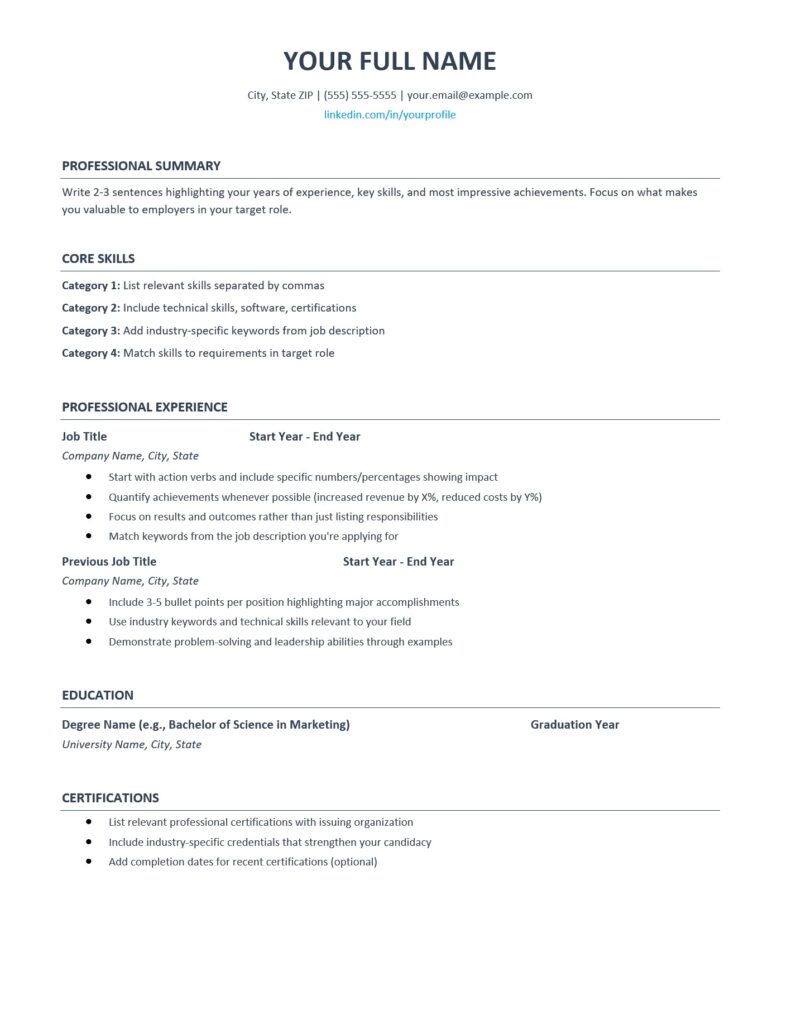
Download Your Free Template:
- Download DOCX Template (fully editable in Microsoft Word)
Interview Guys Tip: The DOCX template is fully editable, allowing you to adjust fonts, colors, and spacing to match your personal brand while maintaining professional formatting. Just replace the placeholder text with your own information.
Here’s what most people don’t realize: employers now expect multiple technical competencies, not just one specialization. The days of being “just a marketer” or “just an analyst” are over. You need AI skills, project management, data literacy, and more. Building that skill stack one $49 course at a time is expensive and slow. That’s why unlimited access makes sense:
Your Resume Needs Multiple Certificates. Here’s How to Get Them All…
We recommend Coursera Plus because it gives you unlimited access to 7,000+ courses and certificates from Google, IBM, Meta, and top universities. Build AI, data, marketing, and management skills for one annual fee. Free trial to start, and you can complete multiple certificates while others finish one.
Essential Components of Your 2025 ATS Resume
Your ATS-optimized resume should follow a specific structure. Start with contact information at the top: full name, phone number, email, city and state, and LinkedIn profile URL.
Next comes your professional summary. This 2-3 sentence section highlights your years of experience, key skills, and biggest achievements. It’s your elevator pitch on paper.
The core skills section is critical for ATS optimization. List technical competencies, software proficiency, and industry keywords organized into 3-4 categories. This section alone can make or break your ATS score because it’s where the software looks for keyword matches.
Your professional experience section lists jobs in reverse chronological order. Each position needs your job title, company name, location, and employment dates. Under each role, include 3-5 bullet points that start with strong action verbs and include quantifiable achievements.
Education comes next, listing your most recent degree first with the degree name, school, location, and graduation year. Recent graduates with limited experience should consider placing education before professional experience.
Finally, add a certifications section if relevant. Professional credentials can give you an edge, especially in healthcare, IT, or finance.
How to Fill Out Each Section Strategically
Writing your professional summary requires careful thought. Identify the 2-3 most important requirements from the job description and address them directly. If the role emphasizes “data-driven decision making,” mention your track record of using analytics to drive results.
Your core skills section needs to mirror the language in job descriptions you’re targeting. When a posting mentions “project management,” use exactly that phrase rather than “managing projects.” ATS systems often search for specific keywords, and synonyms don’t always register.
Studies show that tailoring your resume to match the job title and key requirements can increase your interview chances by 3.5 times. That means pulling keywords directly from the job posting and incorporating them naturally.
For professional experience bullets, follow a proven formula: action verb + what you did + quantified result. Instead of “Managed social media accounts,” write “Grew social media engagement by 35% across three platforms within six months.”
Numbers matter. Resumes with quantified achievements are significantly more likely to get callbacks. If you increased revenue, saved costs, improved efficiency, or led a team, put numbers to it.
Interview Guys Tip: If you struggle to quantify past achievements, estimate based on typical project scopes. “Managed a team of 5,” “Oversaw a budget of approximately $50K,” or “Served 30+ customers daily” all add concrete detail.
Common ATS-Killing Mistakes to Avoid
Creative section headers will tank your ATS score. When you label your work experience as “Where I’ve Made an Impact,” the ATS might not recognize it. Stick with conventional headers.
While PDFs are generally fine now, Word documents (.docx) remain the safest choice. Some older ATS platforms still struggle with PDF parsing.
Never place critical information in headers or footers. Many ATS systems don’t scan these areas at all. Keep everything in the main body.
Graphics, logos, photos, and charts will either be ignored or cause parsing errors. Save the visual creativity for your LinkedIn profile.
Stick with standard fonts like Calibri, Arial, Georgia, or Times New Roman. Font sizes should range from 10-12 points for body text and 14-16 points for your name.
Spelling and grammar errors hurt you doubly with ATS. The software may not recognize misspelled keywords, and human reviewers will immediately question your attention to detail.
Interview Guys Tip: Never submit a generic resume. At minimum, update your professional summary and add 3-5 keywords from each job description. This small effort dramatically improves your ATS score.
Keyword Optimization Without Keyword Stuffing
Keywords are the secret sauce of ATS optimization, but there’s a right way and wrong way to use them. The wrong way is cramming every possible keyword until it reads like a robot wrote it.
Start by analyzing job descriptions in your target field. Look for skills, qualifications, and responsibilities that appear repeatedly. Common categories include technical skills, software programs, methodologies, certifications, and industry terminology.
Place keywords in your core skills section first. This gives you a designated space to list terms ATS systems scan for without forcing them awkwardly into experience bullets.
Next, weave keywords naturally into your professional experience bullets. If “customer relationship management” appears in the job description and you’ve done that work, describe how you “managed customer relationships resulting in 25% improved retention.”
Your professional summary offers another prime spot for important keywords. When the job requires “strategic planning” and you have that experience, mention it in your opening paragraph.
Never sacrifice clarity for keywords. If forcing a specific term makes your sentence awkward, rephrase it. Remember, if your resume passes ATS screening, an actual human reads it next.
Some candidates try hiding keywords by making them white text. Don’t do this. Many ATS systems flag this as attempted manipulation.
Interview Guys Tip: Before you submit another application, run your resume through an ATS scanner. Most job seekers skip this step and wonder why they never hear back. Check out the free ATS checker we use and recommend →
How Our Free Template Handles ATS Requirements
Our template is built specifically to pass ATS screening while looking professional to human reviewers. It uses a single-column layout that ATS systems parse perfectly, with no tables, text boxes, or columns.
Every section header uses standard terminology ATS software recognizes. You’ll find “Professional Summary” not “About Me,” “Professional Experience” not “My Journey,” and “Core Skills” not “What I Bring to the Table.”
The formatting relies on simple, built-in Word styles for consistency. Bullet points use Word’s standard bullet style with proper indentation.
We’ve included both an example resume and a blank template. The example shows you exactly how to format information with strong action verbs, quantified achievements, and strategic keyword placement. The blank template has instructional text guiding you through each section.
Both versions use ATS-friendly fonts and sizing. Contact information is formatted in the document body, not hidden in a header. The layout provides plenty of white space while remaining compact enough to fit on one page.
Looking at how to list skills on a resume effectively, our template organizes them into clear categories that help both ATS systems and human reviewers quickly assess your qualifications.
Customizing Your Template for Different Industries
While the basic structure works across industries, smart customization improves your results.
In technical fields like software engineering or data science, your core skills section becomes paramount. List programming languages, frameworks, tools, and methodologies prominently.
For creative roles in marketing, design, or content creation, use strong action verbs that show innovation. Include metrics around campaigns, engagement, or content performance.
Healthcare and medical positions require specific certifications listed with full, official names. Don’t abbreviate “Registered Nurse” as “RN” because ATS might search for the full term.
Business and finance roles benefit from emphasizing analytical skills, software proficiency, and quantified achievements around revenue, cost savings, or efficiency improvements.
The key is researching job descriptions in your target field and noting which qualifications appear most frequently.
Beyond the Template: Your Job Search Strategy
Getting your resume past ATS is just the beginning. Build a strong LinkedIn profile that mirrors your resume’s key achievements. Many recruiters search LinkedIn first.
Network strategically within your industry. Reach out to former colleagues, attend industry events, and engage meaningfully with professionals in your field.
When you apply, don’t just submit and hope. Follow up thoughtfully after a week or two with a brief email reiterating your interest.
Finally, prepare for interviews by practicing responses using our SOAR method. This framework helps you structure behavioral interview answers emphasizing obstacles overcome and results achieved.
Frequently Asked Questions
How many keywords should I include?
There’s no magic number. Focus on including 15-20 of the most important keywords from the job description naturally throughout your resume. Prioritize terms that appear multiple times or are listed as required qualifications.
Can I use color in an ATS-friendly resume?
Subtle use of color for section headers or your name is fine. Avoid excessive colors or colored backgrounds that might reduce readability.
How long should my ATS resume be?
For most professionals with less than 10 years of experience, one page is ideal. If you have extensive relevant experience, two pages is acceptable. Never exceed two pages.
Do I need a different resume for each job application?
While you don’t need to completely rewrite your resume, customize key sections. Update your professional summary, adjust your core skills to match the job description, and reorder bullet points to emphasize relevant achievements.
Start Getting Interviews Today
You now have everything needed to create an ATS-proof resume that gets you past initial screening and in front of hiring managers. Our free template takes the guesswork out of formatting, and the strategies we’ve covered help you fill it out strategically.
Download both the example and blank versions of our template. Study the example to see how strong action verbs, quantified achievements, and strategic keywords work together. Then fill out your own version using the blank template.
Remember to customize your resume for each application. Those extra 15 minutes of tailoring separate candidates who get interviews from those who don’t.
Want more free resources? Browse our complete free resume templates library for templates targeting specific industries and experience levels. Each one is built with ATS optimization in mind while maintaining professional appearance.
Your resume is your marketing document. With the right template and strategic approach, you’ll stop wondering why you never hear back and start fielding interview requests instead.
Here’s what most people don’t realize: employers now expect multiple technical competencies, not just one specialization. The days of being “just a marketer” or “just an analyst” are over. You need AI skills, project management, data literacy, and more. Building that skill stack one $49 course at a time is expensive and slow. That’s why unlimited access makes sense:
Your Resume Needs Multiple Certificates. Here’s How to Get Them All…
We recommend Coursera Plus because it gives you unlimited access to 7,000+ courses and certificates from Google, IBM, Meta, and top universities. Build AI, data, marketing, and management skills for one annual fee. Free trial to start, and you can complete multiple certificates while others finish one.

BY THE INTERVIEW GUYS (JEFF GILLIS & MIKE SIMPSON)
Mike Simpson: The authoritative voice on job interviews and careers, providing practical advice to job seekers around the world for over 12 years.
Jeff Gillis: The technical expert behind The Interview Guys, developing innovative tools and conducting deep research on hiring trends and the job market as a whole.