
Administrative Assistant Resume Template: ATS Ready Examples & Writing Guide [2025]
Landing an administrative assistant position in 2025 requires more than just listing your typing speed and phone etiquette. You’re competing in a market where the median annual wage is $47,460, and employers are looking for candidates who can prove they’ll save time, reduce costs, and keep operations running smoothly.
Your resume is your first chance to demonstrate the organizational skills you’ll bring to the role. A generic, one-size-fits-all resume will get lost in the shuffle. You need a targeted document that showcases your ability to manage complex calendars, streamline office processes, and support executives effectively.
By the end of this article, you’ll have access to a professional administrative assistant resume template you can download and customize, plus insider knowledge on what hiring managers actually look for when reviewing applications. Whether you’re an experienced administrative professional or transitioning into your first office role, you’ll learn exactly how to structure your resume for maximum impact.
☑️ Key Takeaways
- Administrative assistant resumes need quantifiable achievements to demonstrate your impact on office efficiency and executive productivity
- ATS optimization is critical since over 75% of administrative resumes are initially screened by applicant tracking systems
- The right resume format matters with reverse-chronological order being most effective for showcasing your progressive administrative experience
- Core skills sections should balance technical proficiencies like Microsoft Office 365 with soft skills like communication and organization
What Makes an Administrative Assistant Resume Different?
Administrative assistant resumes require a unique approach because you’re essentially marketing yourself as someone who makes other people more productive. Unlike technical roles where you can point to specific projects or code you’ve written, your value comes from enabling others to do their best work.
Your resume needs to demonstrate three core capabilities. First, your organizational systems and processes that create efficiency. Second, your ability to anticipate needs and solve problems proactively. Third, your discretion and professionalism when handling sensitive information and high-level communications.
The best administrative assistant resumes quantify impact wherever possible. Instead of saying you “managed calendars,” you should specify that you “coordinated 40+ weekly meetings across three executives with zero scheduling conflicts.” Numbers transform vague claims into concrete evidence of your capabilities.
Interview Guys Tip: Administrative roles are highly competitive, with about 358,300 job openings projected annually according to the Bureau of Labor Statistics. Your resume needs to immediately communicate why you’re the candidate who will make the hiring manager’s life easier from day one.
Administrative Assistant Resume Example
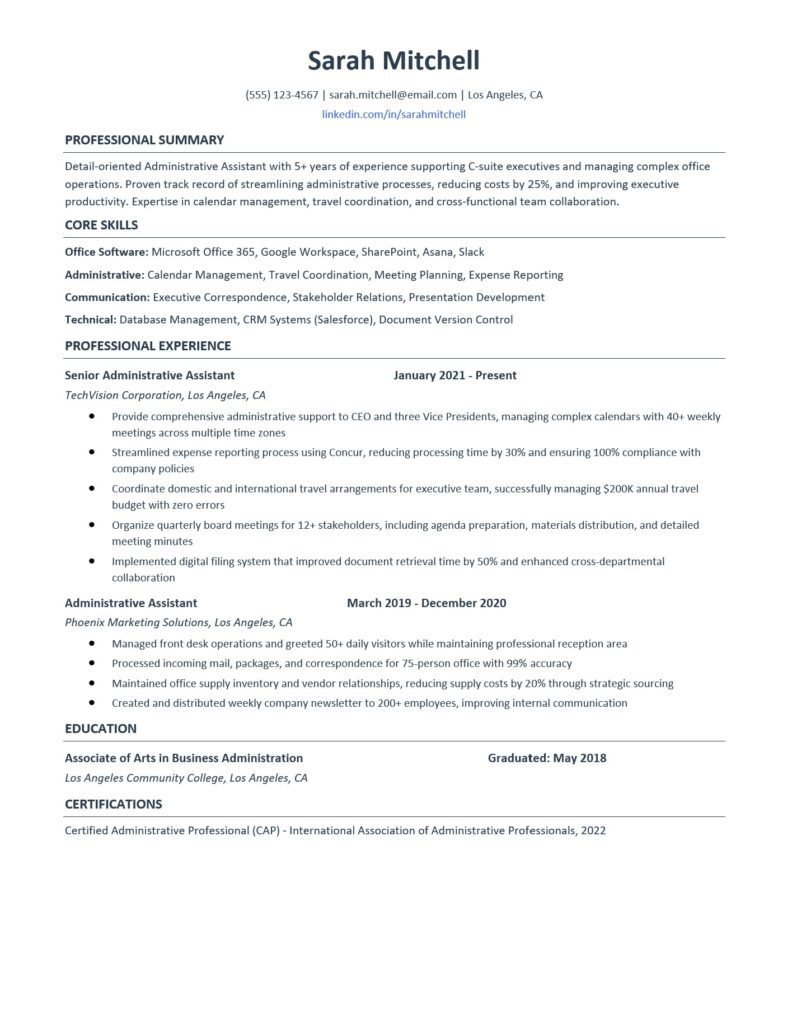
Here’s a professional administrative assistant resume example. This example gives you an idea of what type of content fits in a good ATS friendly resume.
Example Resume:
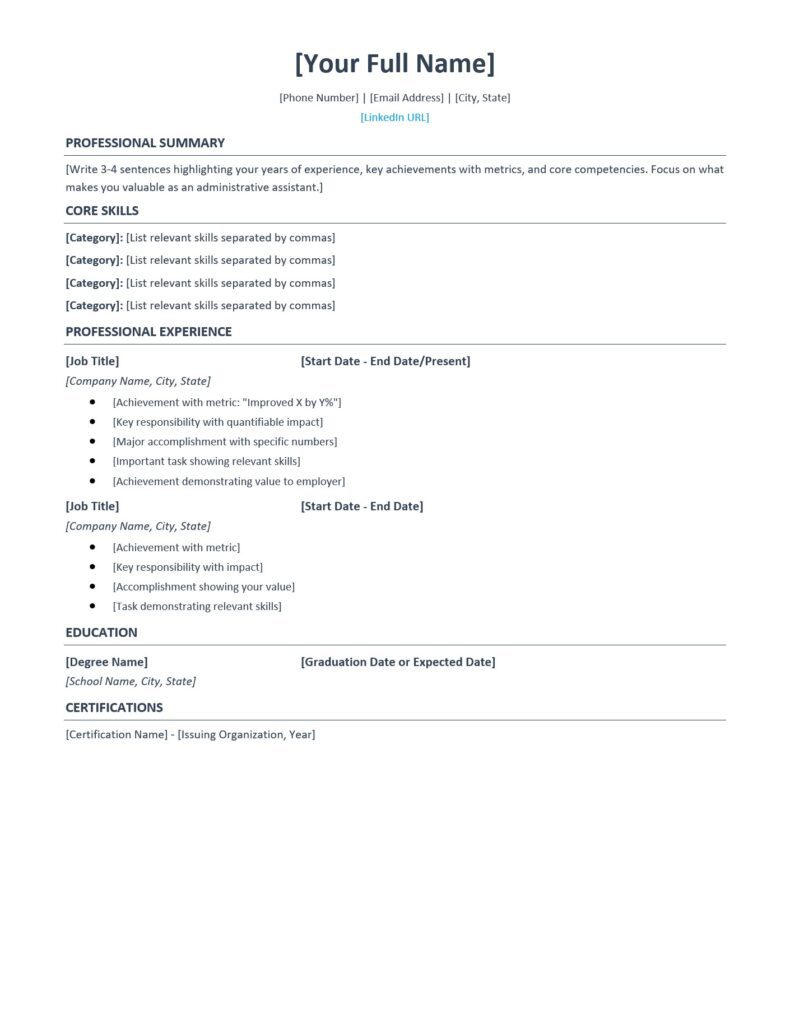
Here’s a professional administrative assistant resume template you can download and customize. This template is designed to be both visually appealing and ATS-friendly, with clean formatting that highlights your strengths.
Blank Customizable Template
Download Your Free Template:
- Download DOCX Template (fully editable in Microsoft Word)
Interview Guys Tip: The DOCX template is fully editable, allowing you to adjust fonts, colors, and spacing to match your personal brand while maintaining professional formatting. Just replace the placeholder text with your own information.
Here’s what most people don’t realize: employers now expect multiple technical competencies, not just one specialization. The days of being “just a marketer” or “just an analyst” are over. You need AI skills, project management, data literacy, and more. Building that skill stack one $49 course at a time is expensive and slow. That’s why unlimited access makes sense:
Your Resume Needs Multiple Certificates. Here’s How to Get Them All…
We recommend Coursera Plus because it gives you unlimited access to 7,000+ courses and certificates from Google, IBM, Meta, and top universities. Build AI, data, marketing, and management skills for one annual fee. Free trial to start, and you can complete multiple certificates while others finish one.
Essential Components of Your Administrative Assistant Resume
Every administrative assistant resume should include these six core sections arranged in strategic order for maximum readability and ATS compatibility.
Contact Information
Start with your full name, phone number, email address, and city/state. Skip your complete street address as it’s unnecessary and takes up valuable space. Include your LinkedIn profile if it’s current and professional. This section should be clean, centered, and easy to scan at a glance.
Professional Summary
Your professional summary is your elevator pitch in written form. This 3-4 sentence paragraph appears at the top of your resume and should immediately grab attention with your most impressive qualifications.
Focus on your years of experience, key achievements with metrics, and the specific value you bring. For example: “Detail-oriented Administrative Assistant with 5+ years of experience supporting C-suite executives and managing complex office operations. Proven track record of streamlining administrative processes, reducing costs by 25%, and improving executive productivity.”
Tailor this section to each job application by incorporating keywords from the job description. If the posting emphasizes calendar management and travel coordination, make sure those skills appear in your summary.
Core Skills
The skills section serves two purposes. It helps you pass ATS screening software, and it gives hiring managers a quick snapshot of your capabilities. Organize your skills into logical categories like Office Software, Administrative Competencies, Communication, and Technical Skills.
Include both hard skills like proficiency in Microsoft Office 365, Google Workspace, and project management tools, plus soft skills like time management, problem-solving, and stakeholder relations. Each skill you list should directly relate to requirements in the job posting.
Interview Guys Tip: Don’t just list “Microsoft Office” as a skill. Be specific about which applications you know and at what level. “Advanced Excel including VLOOKUP, pivot tables, and macros” tells a much stronger story than generic software mentions.
Professional Experience
This is the meat of your resume where you prove your value through specific accomplishments. List your work history in reverse-chronological order, starting with your most recent position.
For each role, include your job title, company name, location, and dates of employment. Then use 4-6 bullet points to describe your key achievements and responsibilities. Start each bullet with a strong action verb and include quantifiable results whenever possible.
Transform basic task descriptions into achievement statements. Instead of “Answered phones and scheduled meetings,” write “Managed high-volume phone system handling 50+ daily calls while maintaining 40+ weekly executive meetings with 100% accuracy.” The difference is dramatic.
Focus on achievements that demonstrate the four key administrative competencies: organization, communication, technology proficiency, and problem-solving. If you streamlined a process, reduced costs, improved efficiency, or enhanced communication, quantify those wins.
Education
Administrative assistant positions typically require a high school diploma at minimum, though many employers prefer candidates with associate or bachelor’s degrees. List your highest degree first with the institution name, location, and graduation date.
If you have relevant coursework in business administration, office management, or communications, you can include that as well. For recent graduates, you can also mention relevant honors or achievements that demonstrate your work ethic and attention to detail.
Certifications
Professional certifications can set you apart from other candidates and demonstrate your commitment to the field. The Certified Administrative Professional (CAP) certification from the International Association of Administrative Professionals is the gold standard in this industry.
Other valuable certifications include Microsoft Office Specialist credentials, project management certificates, and specialized software proficiencies relevant to your target industry. List the certification name, issuing organization, and year obtained.
How to Write Each Section for Maximum Impact
Crafting Your Professional Summary
Your professional summary should be the last thing you write, even though it appears first on your resume. After you’ve detailed your experience and achievements, you’ll have a clearer picture of your strongest selling points.
Use this formula: [Years of experience] + [Key skills/specialties] + [Biggest achievement with metric] + [What you’re looking for]. Keep it under 100 words and pack it with keywords from the job description.
Selecting the Right Skills
Choose 12-16 skills that directly match the job requirements. Review the posting carefully and note which competencies appear multiple times or are emphasized. Those should definitely appear in your skills section.
Balance technical proficiencies with interpersonal abilities. Administrative assistants need both the technical chops to master software platforms and the soft skills to communicate effectively with everyone from entry-level employees to C-suite executives.
Writing Powerful Experience Bullets
Every bullet point in your experience section should pass what we call “the so what test.” After reading each statement, ask yourself “so what?” If you can’t immediately answer how that accomplishment benefited the organization, rewrite it.
Use the PAR formula: Problem + Action + Result. Identify a challenge you faced, explain what you did about it, and quantify the positive outcome. For example: “Inherited disorganized filing system (Problem), implemented color-coded digital archive (Action), reducing document retrieval time by 60% (Result).”
When you eventually land interviews and need to discuss your experience, remember to use the SOAR Method when answering behavioral questions. Describe the Situation, the Obstacles you faced, the Actions you took, and the Results you achieved.
Interview Guys Tip: Before you submit another application, run your resume through an ATS scanner. Most job seekers skip this step and wonder why they never hear back. Check out the free ATS checker we use and recommend →
Common Mistakes to Avoid
Many administrative assistant resumes fail because of easily preventable errors. Don’t let these common pitfalls sink your application.
- Listing duties instead of achievements. Your resume shouldn’t read like a job description. Employers know what administrative assistants do in general. They want to know what you specifically accomplished and how well you did it.
- Neglecting ATS optimization. Over 75% of resumes are initially screened by applicant tracking systems that scan for specific keywords. If your resume doesn’t contain the right terms, it may never reach human eyes. Carefully mirror the language used in the job posting.
- Using an outdated format. Fancy graphics, multiple columns, and unusual fonts might look creative, but they confuse ATS software and make your resume harder to scan. Stick with a clean, professional format with clear section headers and standard fonts like Calibri or Arial.
- Including irrelevant information. Your high school babysitting job or volunteer work from a decade ago probably doesn’t belong on your administrative assistant resume. Focus on recent, relevant experience that demonstrates the skills employers are seeking for this specific role.
- Making it too long. Unless you have 10+ years of administrative experience, your resume should fit on one page. Be ruthless in editing. Every single line should serve a purpose in demonstrating why you’re the ideal candidate.
ATS Optimization and Keywords
Applicant tracking systems have become standard in the hiring process, especially for administrative roles where companies may receive hundreds of applications. Understanding how to optimize your resume for ATS is no longer optional, it’s essential.
ATS software scans resumes for specific keywords and phrases that match the job description. It then ranks candidates based on how well their resumes align with the requirements. If your resume doesn’t score high enough, it never reaches a human recruiter.
To optimize for ATS, start by carefully analyzing the job posting. Highlight the skills, qualifications, and experience requirements that appear multiple times or are marked as essential. These are your target keywords.
Incorporate these keywords naturally throughout your resume, especially in your skills section and professional experience bullets. If the posting mentions “calendar management,” use that exact phrase rather than alternatives like “scheduling” or “appointment coordination.”
Use standard section headers like “Professional Experience,” “Education,” and “Skills” rather than creative alternatives. ATS software is programmed to recognize conventional resume structures, and unusual headers might cause your information to be miscategorized or missed entirely.
Avoid using tables, text boxes, headers, footers, or graphics. While these elements might make your resume visually appealing, they often confuse ATS software and result in garbled or incomplete data extraction.
Save your resume as a .docx file unless the job posting specifically requests a PDF. Some older ATS systems have difficulty parsing PDFs, though most modern systems handle both formats well.
FAQ
What’s the best format for an administrative assistant resume?
The reverse-chronological format works best for most administrative assistants because it highlights your progressive experience and career growth. List your most recent position first and work backward. This format is preferred by 90% of hiring managers and is most compatible with ATS software.
How long should my administrative assistant resume be?
One page is ideal for administrative assistants with less than 10 years of experience. If you have extensive relevant experience or are applying for senior administrative roles, a two-page resume is acceptable. However, every line should provide value. Quality matters more than quantity.
Should I include references on my administrative assistant resume?
No, don’t waste valuable space on references. The phrase “references available upon request” is also unnecessary and outdated. Prepare a separate reference list to provide when requested during the interview process.
What skills are most important for administrative assistants in 2025?
Technical proficiency in office software (Microsoft 365, Google Workspace), communication skills, calendar management, and adaptability to new technologies are critical. Employers increasingly value administrative assistants who understand project management tools, CRM systems, and digital collaboration platforms.
How do I write an administrative assistant resume with no experience?
Focus on transferable skills from other roles, volunteer work, or educational experiences. Highlight organizational projects you’ve managed, customer service experience, technical proficiency, and any internships or part-time office work. Consider getting free certifications to boost your credentials.
Conclusion
Your administrative assistant resume is your marketing tool for landing interviews. It needs to demonstrate not just that you can answer phones and schedule meetings, but that you’re a strategic partner who makes executives more productive and keeps operations running smoothly.
Use the templates provided as your starting point, but customize every element for each application. Tailor your professional summary, mirror keywords from the job description, and ensure your achievements speak directly to what the employer needs.
Remember that your resume works hand-in-hand with other application materials. Once you land that interview using our administrative assistant interview questions guide, you’ll be ready to seal the deal.
Download both the example resume and blank template to get started. For more professional resume templates across different industries and career levels, browse our complete free resume template library to find the perfect format for your needs.
Your next administrative assistant opportunity is waiting. With a polished, strategic resume that showcases your value, you’ll be scheduling your interview before you know it.
Here’s what most people don’t realize: employers now expect multiple technical competencies, not just one specialization. The days of being “just a marketer” or “just an analyst” are over. You need AI skills, project management, data literacy, and more. Building that skill stack one $49 course at a time is expensive and slow. That’s why unlimited access makes sense:
Your Resume Needs Multiple Certificates. Here’s How to Get Them All…
We recommend Coursera Plus because it gives you unlimited access to 7,000+ courses and certificates from Google, IBM, Meta, and top universities. Build AI, data, marketing, and management skills for one annual fee. Free trial to start, and you can complete multiple certificates while others finish one.

BY THE INTERVIEW GUYS (JEFF GILLIS & MIKE SIMPSON)
Mike Simpson: The authoritative voice on job interviews and careers, providing practical advice to job seekers around the world for over 12 years.
Jeff Gillis: The technical expert behind The Interview Guys, developing innovative tools and conducting deep research on hiring trends and the job market as a whole.