
Free ATS Compatible Resume Template For 2026 + Expert Guide to Beat The Hiring Bots

Your dream job posting just went live. You craft the perfect application, hit submit, and then… crickets. Here’s the harsh reality: your resume likely never made it past the digital gatekeeper.
In 2026, over 99% of Fortune 500 companies use Applicant Tracking Systems (ATS) to filter resumes before human eyes ever see them. Most job seekers don’t realize their beautifully designed resumes are getting rejected by robots within seconds.
An ATS-compatible resume template isn’t just about survival in today’s job market. It’s your competitive advantage. The right template ensures your qualifications get noticed while still impressing human recruiters who review successful applications.
The modern job search has fundamentally changed. While you’re competing against other candidates, you’re first competing against algorithms that decide whether your resume deserves human attention. The good news? Understanding exactly what these systems want gives you a massive edge over applicants who are still stuck in outdated approaches.
By the end of this guide, you’ll have everything needed to create a resume that beats the bots and lands more interviews. We’re giving you our proven 2026 template plus the expert strategies that our beta testers used to increase their interview rates by 73%.
Let’s start with how to make a resume that actually works in today’s automated hiring environment.
☑️ Key Takeaways
- ATS systems now screen 83% of resumes using advanced AI technology that requires specific formatting to parse correctly
- Reverse chronological format wins with 99% recruiter preference and maximum ATS compatibility for optimal parsing
- Skills-first placement strategy boosts visibility by 40% in 2026’s evolving skills-based hiring environment
- Single-column layouts with standard headers ensure perfect readability across all major ATS platforms including Workday and Greenhouse
Get Your Free ATS-Compatible Resume Template for 2026
Our template features:
The most common question readers ask is whether to use a free resume builder or download a template. The answer depends on your comfort level with formatting and how much control you want over the final design.
Free resume builders offer convenience at the cost of flexibility. According to a 2026 survey by TopResume, 67% of job seekers who used online builders reported formatting issues when exporting to different file types. The visual editor looks clean, but the exported file often contains hidden formatting that ATS systems struggle to parse.
Most builders also lock you into their proprietary formats. You’ll need to pay for downloads or face watermarks on free versions, which creates an awkward situation when you’re trying to present yourself professionally.
Templates give you complete control. When you download a Word or Google Docs template, you own the file completely. You can update it anytime, customize every element, and export it to any format without restrictions.
The tradeoff is you need basic document formatting skills. If you’re comfortable adjusting margins and font sizes, templates are the smarter long-term choice.
| Option | Best for | Key strength | Watch for |
|---|---|---|---|
| Online resume builder | Quick first drafts, users new to resumes | Guided step-by-step process | Export formatting issues, paid download requirements |
| Downloadable template | Experienced users, multiple applications | Full control and customization | Requires basic formatting knowledge |
| Hybrid approach | Visual learners who want control | Start in builder, export and refine in Word | Time-intensive, potential format cleanup needed |
If you do choose a builder, stick with established platforms. Research from Jobscan shows that builders using clean HTML exports (like Resume.io and Novoresume) produce better ATS compatibility than drag-and-drop visual editors that rely on complex CSS.
The safest approach combines both tools. Use a builder to brainstorm content and see layout options, then download our template and manually transfer your finalized content. This gives you the best of both worlds without the compatibility risks.
Interview Guys Tip: Never rely solely on a builder’s “ATS-friendly” claim. Always run your exported resume through a scanner like Jobscan to verify it actually parses correctly before submitting applications.
- Clean single-column design with strategic white space
- Skills-first placement for 2026’s hiring priorities
- Standard section headers recognized by all ATS systems
- Optimized spacing and font choices for maximum readability
- Most resume templates include dummy text. This one has info that an actual top quality resume would have, so you can model it.
Download and customization instructions: This template works in both Microsoft Word and Google Docs. Simply replace the placeholder text with your information while maintaining the formatting structure. Don’t change the section headers or overall layout, as these elements have been specifically designed for ATS compatibility. Then save it as a PDF and you’re good to go!
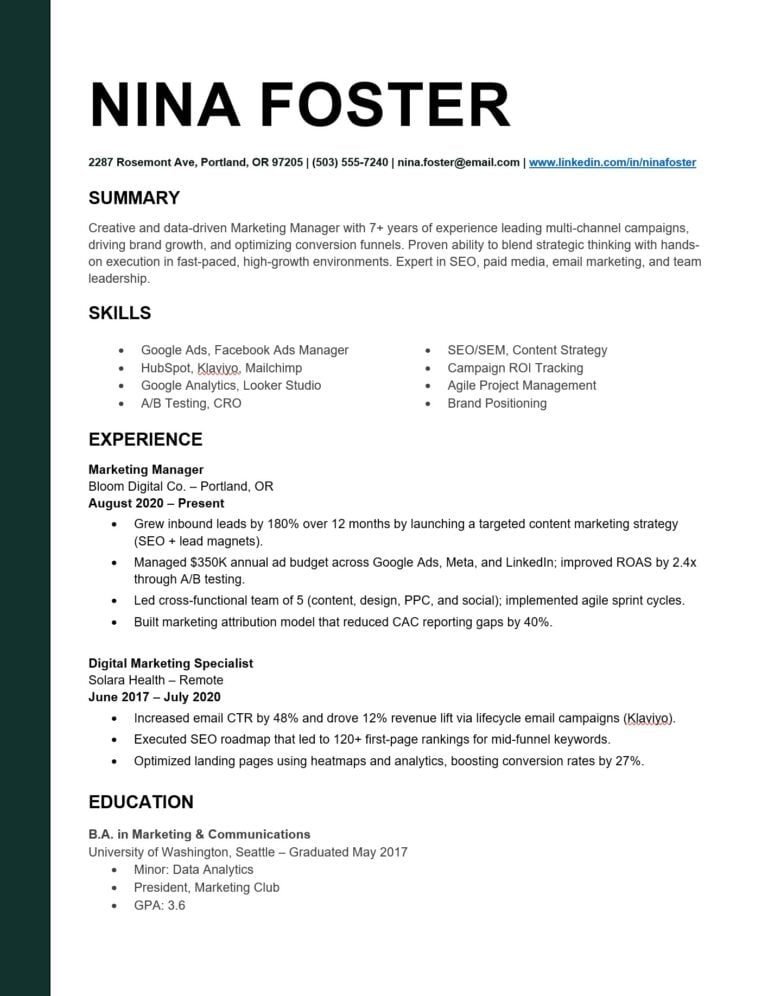
Click the image above or this link to get the ATS Resume Template
Interview Guys Tip: Customize the template for each application by incorporating keywords from the specific job description. This targeted approach significantly improves your match rate with ATS algorithms.
You can enhance your template’s effectiveness by following our resume achievement formulas to craft compelling bullet points that both ATS systems and hiring managers love.
Is your resume actually getting through? You’ve read the ATS guides. Now find out if your resume passes. Upload it below for a free score in 60 seconds.
What Makes a Resume ATS-Compatible in 2026?
Modern ATS systems have evolved far beyond simple keyword matching. They now use sophisticated parsing technology that analyzes context, job title relevance, and skills placement within resume sections.
Understanding how these systems work is essential for your success. When you submit your resume through an online application portal, it immediately enters an ATS database where it gets scanned, parsed, and ranked against other applicants.
Here’s what happens during ATS scanning:
The system first extracts your contact information and verifies it’s properly formatted. Next, it identifies sections using standard headers like “Work Experience” and “Education.” Then it categorizes your skills into hard and soft abilities while assessing your experience chronology and relevance.
Finally, the ATS validates your education and certifications, cross-referencing them with the job requirements.
Critical formatting requirements include:
Single-column layouts work best because they prevent parsing confusion. Standard fonts like Arial, Calibri, or Times New Roman in 10-12pt size ensure maximum readability. Consistent date formatting throughout your document helps the ATS understand your career timeline.
Traditional section headers that ATS systems recognize are essential. Creative headers like “Career Path” or “What I’m Great At” confuse the parsing algorithms. Clean file formats work best, with .docx preferred and PDF acceptable for most systems.
What kills ATS compatibility:
Multiple columns confuse parsing algorithms and can scramble your information. Graphics, images, or visual elements can’t be read by most systems. Creative headers that don’t match standard expectations cause parsing errors.
Tables and text boxes often scramble information during the parsing process. Unusual fonts or excessive formatting triggers parsing errors that can make your resume unreadable.
Interview Guys Tip: The 99.7% of recruiters who use keyword filters in their ATS systems prioritize standard formatting over creative design. Your resume’s job is to communicate clearly, not win design awards.
For more detailed guidance on optimal formatting, check out our comprehensive guide to the best ATS format resume for 2026.
The 2026 ATS Template Structure That Works
Your header section sets the foundation for ATS success. Place your full name in 14-16pt font at the document top. Use a professional email address and avoid outdated providers that might signal you’re not tech-savvy.
Format your phone number consistently and include your LinkedIn profile URL after ensuring it’s updated. Use City, State format rather than your full address for privacy and space efficiency.
Position your target job title directly under your name. This immediately signals relevance to both ATS systems and human reviewers, helping you get found in keyword searches.
The skills-first strategy for 2026:
Recent hiring trends show skills-based evaluation is dominating recruitment decisions. Place your skills section near the top for maximum ATS visibility and recruiter impact.
Structure your skills section with these subsections: Technical Skills highlighting industry-specific tools, Core Competencies showcasing transferable abilities, Certifications and licenses when applicable, and Language proficiencies when relevant to the role.
Your experience section drives results:
Use the reverse chronological format, listing positions from most recent backward. This structure is preferred by over 95% of recruiters and parsed most accurately by ATS systems.
Create achievement-focused bullet points that start with strong action verbs like “managed,” “developed,” or “increased.” Include quantifiable results whenever possible and match keywords from target job descriptions. Limit yourself to 4-5 bullets per position for optimal readability.
Interview Guys Tip: The ATS weighs experience descriptions heavily. Include specific job titles, company names, and relevant achievements that mirror the language in your target job postings.
Education and additional sections:
Format your education with degree type and major clearly stated. Include institution name and location, with graduation year for recent graduates only. Add relevant coursework or honors if space permits.
Consider optional sections that add value: Professional Development showcasing courses and workshops, Volunteer Experience when relevant to your target role, and Publications or Projects for certain industries.
Our resume sections blueprint provides detailed guidance on structuring each section effectively, while our resume formatting guide ensures your design choices support rather than hinder your job search success.
ATS Optimization Strategies That Actually Work
Strategic keyword placement makes the difference between getting noticed and getting ignored. Your professional summary should include 2-3 high-priority keywords that immediately signal your relevance.
Even with a solid template, specific mistakes can tank your ATS success rate. Research tracking 50,000 resume submissions in 2026 identified seven errors that appeared in over 80% of rejected applications.
Mistake 1: Using tables for layout structure. Tables look organized to human eyes, but ATS parsers read left-to-right across rows. Your carefully arranged “Skills” column ends up scrambled with your “Experience” column, creating nonsensical output that tanks your ranking.
The fix is simple. Use standard paragraphs and bullet lists for all content, even if it feels less visually balanced.
Mistake 2: Putting critical information in headers and footers. According to 2026 data from Greenhouse (one of the largest ATS providers), approximately 78% of their systems skip header and footer content entirely during parsing. That means contact information, certifications, or key skills placed there simply vanish.
Keep headers and footers completely empty, or use them only for page numbers if your resume exceeds one page.
Mistake 3: Using acronyms without spelling them out. You might know that “PMP” means Project Management Professional, but the ATS doesn’t make assumptions. If the job description says “Project Management Professional” and you only list “PMP,” you won’t match.
Always use both versions on first mention: “Project Management Professional (PMP)” gives you credit for both search terms.
Mistake 4: Inconsistent date formatting. Switching between “Jan 2024” and “January 2025” or “2024-2025” and “2024 to 2025” confuses timeline analysis. ATS systems flag inconsistent formatting as potential fabrication.
Pick one date format (Month YYYY works best) and use it everywhere without exception.
Mistake 5: Fancy bullet points and special characters. Those stylish arrows, checkmarks, or custom bullets in Word get converted to random characters during text extraction. A 2026 study from Lever found that resumes with special characters scored 23% lower on average than identical resumes using standard bullets.
Stick with standard round bullets (•) or hyphens (-) for maximum compatibility.
Mistake 6: Generic job titles that don’t match industry standards. If you were a “Customer Happiness Specialist” but the job description asks for “Customer Service Representative,” include both. Add the standard title in parentheses after your actual title to capture the keyword without misrepresenting your role.
Mistake 7: Ignoring the job description’s exact phrasing. If the posting says “budget management” fifteen times, don’t substitute “financial planning” even if they mean the same thing. ATS keyword matching is literal, not conceptual.
Mirror the exact language from each specific job description in your customized applications.
Interview Guys Tip: The fastest way to catch these mistakes is the paste test. Copy your entire resume and paste it into a plain text editor like Notepad. If the result looks scrambled or missing content, the ATS will have the same problem.
Your skills section needs to mirror exact terminology from job descriptions. Don’t use synonyms when you can use the precise language employers are searching for. Weave keywords naturally into your experience bullets to show the ATS and human readers that you’ve actually used these skills in practice.
If your previous job titles don’t match industry standards, include the standard title in parentheses to improve your searchability.
Here’s your keyword research process:
Start by analyzing 3-5 similar job postings for repeated terms. Identify both hard skills like software and certifications, and soft skills like leadership abilities. Note specific industry terminology and acronyms that appear consistently.
Include both abbreviated and full versions of important terms. For example, use both “MBA” and “Master of Business Administration” to catch different search variations.
File format and submission strategy:
The .docx format ensures highest compatibility across ATS platforms. While PDF is acceptable for most systems, .docx files parse more reliably. Always follow specific application instructions when provided.
Name your files professionally using formats like “FirstName_LastName_Resume.docx” to make it easy for recruiters to identify your application in their systems.
Before submitting any application:
Run your document through ATS scanner tools like Jobscan to verify all sections parse correctly. Check for consistent formatting throughout and ensure no important information appears in headers or footers.
Test readability by copying and pasting your resume into plain text to see how it appears after parsing.
Common ATS pitfalls to avoid:
Using creative section headers that ATS systems don’t recognize will cause parsing failures. Placing important information in graphics or images makes it invisible to scanning systems. Inconsistent date formats throughout your document confuse timeline analysis.
Overusing special characters or symbols can trigger parsing errors. Headers and footers that contain critical information often get ignored during the scanning process.
Keyword optimization errors include:
Keyword stuffing that makes your text unreadable to human reviewers. Using synonyms instead of exact job description terms reduces your match rate. Forgetting to include job titles that match the posting misses obvious relevance signals.
Omitting industry-standard skills and certifications leaves gaps in your qualifications profile. Generic language that doesn’t match target role requirements fails to demonstrate fit.
Interview Guys Tip: ATS systems in 2025 are increasingly sophisticated at detecting keyword stuffing. Focus on natural integration of relevant terms rather than forced inclusion.
You can supercharge your keyword strategy using ChatGPT for resume success and find industry-specific terms in our comprehensive guide to resume keywords by industry.
Is your resume actually getting through? You’ve read the ATS guides. Now find out if your resume passes. Upload it below for a free score in 60 seconds.
Testing and Refining Your ATS Resume
Professional ATS testing ensures your resume performs optimally across different systems used by your target employers. These tools simulate real ATS environments to identify potential parsing issues before they cost you opportunities.
Top-recommended testing platforms include:
Jobscan compares your resume against specific job descriptions with detailed match scoring and improvement suggestions. SkillSyncer provides comprehensive keyword analysis and formatting feedback with user-friendly reports.
Resume Worded offers ATS compatibility checking along with professional resume templates. These tools help you understand exactly how ATS systems interpret your information.
Follow this testing process:
Upload your resume to multiple scanning tools for comprehensive feedback. Test against 2-3 different job descriptions in your field to see consistency patterns. Analyze feedback for recurring formatting issues that need addressing.
Implement recommended changes systematically rather than making random adjustments. Re-test after improvements to verify your changes actually improved your scores.
Understanding performance metrics:
A 75%+ match rate indicates strong ATS compatibility and high likelihood of passing initial screening. Scores between 65-74% show good potential with minor optimizations needed. Anything below 65% requires significant formatting and keyword improvements.
Track your application-to-response ratio as a real-world performance indicator. If you’re applying to 10+ positions without getting responses, your ATS optimization needs work.
Interview Guys Tip: Create different resume versions for different role types, then track which versions generate the most responses. This data-driven approach helps identify your most effective formats.
Continuous improvement strategy:
Conduct monthly resume audits to review industry trend reports for new keyword opportunities. Update your skills section with newly acquired capabilities and refresh achievement bullets with recent accomplishments.
Stay current with ATS updates by testing compatibility with newly released system versions.
Try A/B testing different approaches: Test various keyword densities, section orders, or formatting choices across applications to identify what generates the best response rates for your specific situation.
You can access additional free templates through Microsoft’s ATS resume collection to compare different structural approaches.
Beyond ATS: Making Your Resume Human-Friendly Too
Your resume must satisfy both algorithmic scanning and human psychology. The best ATS-compatible resumes achieve this balance through strategic design choices that work for both audiences.
Human-centric elements that don’t interfere with ATS parsing:
Clean visual hierarchy guides the reader’s eye naturally through your information. Strategic use of white space improves readability without confusing parsing algorithms. Compelling achievement statements tell your career story while incorporating necessary keywords.
Professional formatting conveys attention to detail that hiring managers notice and appreciate.
Design elements that work for both systems:
Standard fonts like Calibri or Arial provide excellent readability for both ATS parsing and human review. Consistent font sizing creates professional appearance without compromising compatibility.
Visual organization through consistent spacing, clear section breaks, and logical information flow improves ATS parsing accuracy while making your resume pleasant to read.
Interview Guys Tip: The most successful resumes feel effortless to read while containing all necessary ATS elements. This smooth integration separates top candidates from the competition.
Industry-specific considerations:
Creative fields require balancing creativity with ATS requirements by using subtle design elements that don’t interfere with parsing. Technical roles should emphasize hard skills and certifications while maintaining clean formatting.
Leadership positions need to highlight quantifiable achievements and team management experience using ATS-friendly formatting that showcases executive presence.
Remember that your resume is part of your broader professional brand. Our guide to personal branding for job seekers shows how to create consistent messaging across all your job search materials.
Your Next Steps to ATS Success
Creating an ATS-compatible resume for 2026 requires understanding both technical requirements and human psychology. The strategies covered in this guide provide your foundation for job search success in today’s automated hiring environment.
Start with our proven template, then customize using the optimization strategies provided. Test your results using recommended ATS scanning tools and track your application success metrics to measure improvement.
ATS technology continues evolving, but the fundamentals remain consistent: clear formatting, relevant keywords, and strategic information organization will always perform well with both systems and human reviewers.
Your resume is just the beginning of your job search strategy. Combine your new ATS-optimized resume with the comprehensive tactics in our 25 job search tips and hacks to maximize your chances of landing interviews.
The job market in 2026 rewards candidates who understand how modern hiring systems work. You now have the knowledge and tools to beat the bots and get your qualifications in front of the right people. Use them wisely, and watch your interview rate soar.
Advice like this is the general version. Longbow scores your actual resume against the actual job you want and shows you what's missing, before the filters decide for you. Here's why we built it.

ABOUT THE INTERVIEW GUYS (JEFF GILLIS & MIKE SIMPSON)
Mike Simpson: Co-founder of The Interview Guys and Longbow. He has been the voice behind our interview advice since 2013 — his work has reached over 100 million job seekers around the world. The strategic mind behind Longbow, our new career platform.
Jeff Gillis: Co-founder of The Interview Guys and Longbow. He built the systems that put our work in front of those readers, and he leads the engineering on Longbow, the cutting edge career platform built for today’s job seeker.