
How to Make a Portfolio Website That Actually Gets You Hired (2026 Guide)
You just spent three hours perfecting your resume. You tailored every bullet point to the job description, optimized it for ATS screening, and even ran it through an ATS optimization check to make sure nothing slipped through the cracks. But here’s the uncomfortable truth: your resume can only tell hiring managers what you claim to have done. A portfolio website shows them the proof.
And in 2026, proof matters more than promises.
The job market has shifted dramatically toward skills-based hiring. According to NACE’s Job Outlook 2026 survey, 70% of employers now use skills-based hiring for entry-level positions, up from 65% last year. Meanwhile, recent data from HiringThing shows that job seekers now submit anywhere from 32 to over 200 applications before landing an offer, with cold applications producing a success rate of just 0.1% to 2%.
Those aren’t great odds. A portfolio website helps you beat them.
By the end of this guide, you’ll know exactly how to build a portfolio website that gets hiring managers to stop scrolling and start reaching out. We’ll cover what to include, how to structure it, which platform makes the most sense, and the mistakes that quietly kill your chances.
☑️ Key Takeaways
- 70% of employers now use skills-based hiring, which means showing your work through a portfolio is more powerful than ever for landing interviews.
- You don’t need design skills or coding knowledge to build a professional portfolio website because modern website builders handle all the heavy lifting for you.
- Quality beats quantity every time since 3 to 5 strong case studies with measurable results will outperform a cluttered gallery of 15 mediocre projects.
- Your portfolio should tell the story of how you solve problems, not just display finished work, because hiring managers want to see your thinking process.
Disclosure: This article contains affiliate links. If you purchase through these links, we may earn a commission at no additional cost to you.
Why a Portfolio Website Is Your Biggest Competitive Advantage in 2026
Most job seekers stop at a resume and LinkedIn profile. That’s the baseline. It’s what everyone does. And when every applicant looks the same on paper, hiring managers need something more to differentiate you from the stack.
A portfolio website gives you the one thing a resume can’t: space to prove what you’re capable of.
The shift toward skills-based hiring has made this more critical than ever. As Fortune reported, hiring decisions now increasingly rely on what experts call a “portfolio of evidence.” That means employers aren’t just reading bullet points about your accomplishments. They want to see the work, understand your process, and verify the results.
Here’s what a portfolio website gives you that other job search tools simply can’t:
- Control over your professional narrative so hiring managers experience your story the way you want them to
- Visual proof of your skills that bullet points on a resume can never fully convey
- A permanent, searchable home for your best work that won’t get buried in email attachments or lost in application portals
- SEO visibility so recruiters can actually discover you when they search for talent in your field
And this isn’t just for designers or developers anymore. Project managers can showcase successful launches. Marketers can display campaign results with real metrics. Data analysts can present visualizations that brought insights to life. If you’ve done work worth talking about, you have work worth showing.
In our experience helping over 100 million job seekers, the candidate with a professional website consistently stands out over equally qualified applicants who only submit a resume. That website is your unfair advantage…
200 Applicants Have Resumes. Only You Have a Website…
We recommend Squarespace because it gives you a professional online presence that makes you memorable. Choose from designer templates, customize without coding, and create a portfolio that actually gets you interviews. Free 14-day trial, and you can launch your site before other candidates finish tweaking their resume.
Step 1: Pick a Platform and Stop Overthinking It
This is where most people get stuck for weeks. They fall into the trap of comparing every website builder on the market, reading endless reviews, and never actually building anything.
Here’s the reality: the best portfolio website is the one that actually gets built.
You need a platform that looks polished out of the box, doesn’t require coding skills, and can be set up in a weekend. Squarespace checks all three boxes, which is why it’s our top recommendation for job seekers building their first portfolio website.
Their templates are specifically designed for portfolio-style sites, and every single one is mobile-responsive by default. That matters more than you think because over 60% of global web traffic now comes from mobile devices, and recruiters regularly review candidate portfolios on their phones between meetings and during commutes.
You can browse Squarespace’s portfolio templates here to see what’s possible before you commit. The drag-and-drop editor means you can customize layouts, fonts, and colors without writing a single line of code.
Other options like WordPress, Wix, and Webflow exist, but they each come with trade-offs. WordPress offers deep customization but requires more technical knowledge. Wix has flexibility but can look less polished. Webflow is powerful but has a steep learning curve that makes it better suited for designers.
For the vast majority of professionals building a portfolio to support their job search, Squarespace gives you the most professional result with the least amount of friction. Pick it. Start building. You can always refine later.
Step 2: Lock Down a Professional Domain Name
Your URL is the first impression before the first impression. A custom domain like yourname.com immediately signals that you take your career seriously. A free subdomain like yourname.squarespace.com or yourname.wix.com signals the opposite.
Here’s the priority order for choosing your domain:
- FirstnameLastname.com (always the first choice)
- FirstnameMiddleInitialLastname.com (if your name is taken)
- FirstnameLastname.co or FirstnameLastname.me (solid alternatives)
- FirstnameLastnameDesign.com or similar field-specific option
Avoid hyphens, numbers, or anything that’s hard to spell when you say it out loud. The goal is a URL that’s clean enough to put on a business card and easy enough to type from memory.
Most website builders let you purchase and connect a custom domain directly through their platform, so you won’t need to deal with DNS settings or separate hosting providers. Squarespace, for example, includes a free custom domain for the first year with an annual plan.
Step 3: Nail Your Homepage in 10 Seconds or Less
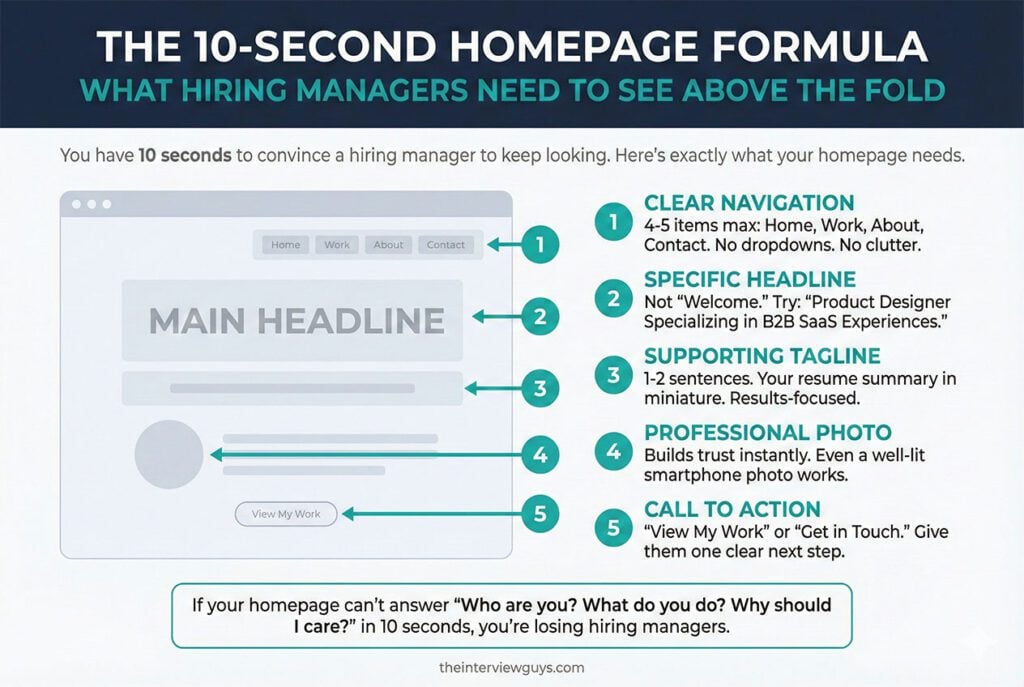
Hiring managers are reviewing dozens of candidates at a time. When they click your portfolio link, you have roughly 10 seconds to convince them to keep looking. Your homepage needs to instantly answer three questions: Who are you? What do you do? Why should I care?
Here’s exactly what should appear above the fold (the part of the page visible before anyone scrolls):
A clear, specific headline. Not “Welcome to My Website” or “Hello, I’m [Your Name].” Something like “Product Designer Specializing in B2B SaaS Experiences” or “Marketing Strategist Who Turns Ad Spend Into Revenue.” Tell them what you do and who you do it for.
A one-to-two sentence supporting tagline. Think of this as your resume summary in miniature. Make it conversational and results-focused.
A professional photo. This is optional but strongly recommended. A quality headshot builds trust and makes your site feel personal rather than corporate. Even a well-lit photo taken with a smartphone against a clean background works.
Simple, intuitive navigation. A hiring manager should immediately see how to find your work, learn about you, and get in touch. Keep your menu to four or five items max: Home, Work/Projects, About, and Contact.
Interview Guys Tip: Want to see how top professionals handle their homepages? We broke down 10 portfolio website examples from people who got hired at companies like Apple, Google, and Meta. The consistent pattern across all of them was clarity. Every single homepage told you exactly who the person was and what they could do within seconds.
Step 4: Curate 3 to 5 Projects That Prove Your Value
This section is the beating heart of your portfolio, and it’s where most people make their biggest mistake. They try to include everything they’ve ever worked on, creating a bloated gallery that dilutes their best work and overwhelms busy reviewers.
Here’s the rule: 3 to 5 of your absolute best projects. That’s it.
According to research from the UX Design Institute, hiring managers consistently prefer a focused selection of strong, relevant work over a large library of average projects. They want to see depth in your thinking and process, not breadth in the number of things you’ve touched.
For each project you include, structure it using these four elements:
The Problem or Challenge
What situation existed before you got involved? What business need or user pain point were you addressing? Starting with the problem immediately shows hiring managers that you understand context, not just execution.
Your Specific Role and Approach
What did you personally contribute? How did you tackle the challenge? This is where you differentiate yourself from every other candidate because it reveals how you think, collaborate, and make decisions.
Be honest about team efforts. If it was collaborative, say so. Hiring managers actually respect transparency about your contributions more than inflated claims about working solo.
The Results (With Numbers)
This is where you close the deal. Quantify your impact whenever possible. Did your redesign increase conversion rates by 23%? Did your campaign generate 150 qualified leads in the first month? Did your process improvement save the team 12 hours per week?
Numbers transform your portfolio from a gallery into evidence. Without them, you’re just showing pretty pictures with no proof they actually worked.
Visual Documentation
Screenshots, mockups, before-and-after comparisons, data charts, process diagrams, or whatever visual evidence makes sense for your work. Show the evolution, not just the final deliverable. Hiring managers want to see the journey as much as the destination.
Interview Guys Tip: Not sure your projects are impressive enough? They probably are. You don’t need Fortune 500 client work to build a compelling portfolio. A freelance project, a volunteer initiative, a side project that solved a real problem, or even a well-executed class project can demonstrate your skills when you frame it around the problem you solved and the results you achieved.
Step 5: Write an About Page That Makes You Memorable
Your About page is typically the second most visited page on a portfolio site. This is where hiring managers decide whether you seem like someone they’d actually want to work with.
Don’t write a stiff, third-person biography that reads like a corporate press release. Write in first person. Be conversational. Let your personality come through while staying professional.
Cover these essentials:
- Your professional story in 2 to 3 focused paragraphs. Highlight the experiences and skills most relevant to the roles you’re targeting. This isn’t a full autobiography. It’s a greatest-hits version of your career.
- What motivates you. A brief mention of what drives your work reveals your values and gives hiring managers a sense of what you’d bring to their team culture.
- Something personal. A hobby, an interest, or a fun fact that makes you human and memorable. Keep it brief, but make it genuine.
- A downloadable resume. Include a link to your full resume as a PDF so hiring managers can grab it with one click.
This page is also the perfect place to link to your LinkedIn profile so recruiters can cross-reference your portfolio with your professional network and see your recommendations.
Step 6: Make Contacting You Effortlessly Easy
This sounds obvious, but you’d be shocked at how many portfolio websites bury their contact information behind multiple clicks or force visitors through a 10-field form. Every barrier you create between a hiring manager and your inbox is a barrier to getting hired.
Your contact page needs three things:
- A simple contact form with just name, email, and message fields
- Your professional email address (ideally one connected to your custom domain)
- Links to your LinkedIn and any other relevant professional profiles
Some professionals also include a scheduling link through tools like Calendly so hiring managers can book a quick call directly. This shows initiative and removes friction from the process.
Step 7: Optimize for Mobile (Seriously, Do Not Skip This)
Over 60% of all web traffic worldwide now comes from mobile devices. In the U.S. specifically, mobile accounts for roughly 47% of web traffic and that number keeps climbing. According to Google’s mobile-first indexing guidelines, Google primarily uses the mobile version of your website for ranking and indexing.
That means if your portfolio looks terrible on a phone, you’re invisible to both recruiters and search engines.
If you build with Squarespace, every template is mobile-responsive by default. Your layout, typography, and image sizing automatically adjust for smaller screens without any extra work on your part.
But even with a responsive template, you should still test your site on your own phone after building it. Check that text is readable without zooming, images load quickly, navigation works smoothly with thumb taps, and your contact form functions properly on mobile browsers.
Step 8: Add Basic SEO So Recruiters Can Discover You
Your portfolio shouldn’t only work when you send someone a direct link. It should also be findable when recruiters search for talent in your field. When someone Googles “UX designer in Austin” or “freelance data analyst in Chicago,” your portfolio should have a realistic shot at showing up.
Here’s the basic SEO checklist for a portfolio website:
- Page titles that include your name and specialty (e.g., “Sarah Chen | Data Analyst Portfolio”)
- Unique meta descriptions for each page that stay under 160 characters
- Alt text on every image that describes what’s shown
- Clean URL structures like yourname.com/projects instead of yourname.com/page?id=38271
- Fast load times, which you get naturally with quality hosting and properly sized images
These aren’t advanced tactics. They’re table stakes that most portfolio websites get wrong, giving you an edge just by doing the basics right.
Step 9: Add Social Proof to Build Instant Credibility
A hiring manager reading your case studies is hearing your side of the story. Testimonials and recommendations add a second voice that confirms what you’re saying is true. That outside validation carries more weight than anything you write about yourself.
Types of social proof you can include:
- Short testimonials from past managers, clients, or colleagues (2 to 3 sentences each is plenty)
- Links to published work, articles, or media mentions
- Relevant certifications and professional credentials
- Awards or recognition you’ve received
You don’t need a wall of testimonials. Even two or three well-placed quotes from credible people can significantly boost your portfolio’s persuasiveness. If you don’t have any yet, reach out to former managers or colleagues and ask directly. Most people are happy to help when asked.
Step 10: Launch It, Link It Everywhere, and Keep It Fresh
Your portfolio isn’t a one-and-done project. It’s a living document that should grow and evolve alongside your career.
Here’s your launch-day checklist:
- Test every single link on desktop and mobile
- Proofread everything (typos on a portfolio site are brutal red flags)
- Add your portfolio URL to your resume header, LinkedIn profile, and email signature
- Include it in every job application, even when the posting doesn’t ask for one
- Update it every 3 to 6 months with fresh projects and current information
Interview Guys Tip: When you send a job application, reference your portfolio in your cover letter with a specific callout like: “I tackled a similar challenge in my recent project for [Client], which you can see at [your URL].” That gives the hiring manager a concrete reason to click instead of a generic “visit my website” link they’ll probably ignore.
What to Include in Your Portfolio by Industry
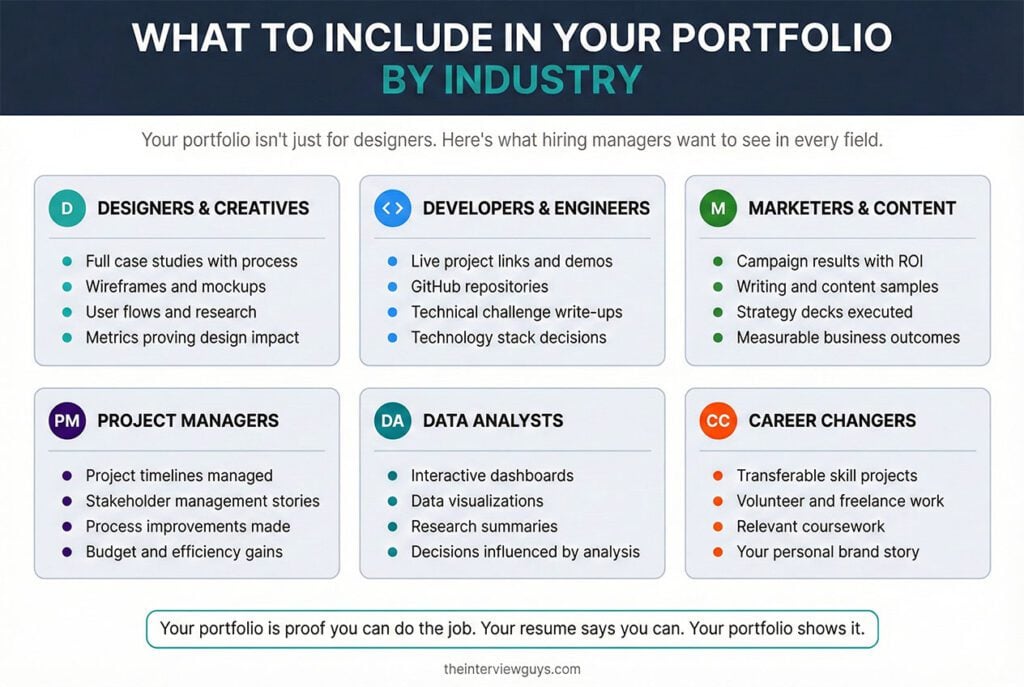
Not sure what kind of projects belong in your portfolio? Here’s a quick breakdown:
- Designers and Creatives: Case studies walking through your full design process, from research through final deliverables. Include wireframes, mockups, user flows, and the metrics that prove your designs actually worked.
- Developers and Engineers: Live project links, code samples, GitHub repositories, and descriptions of technical challenges you solved. Highlight the specific technologies you chose and why.
- Marketers and Content Creators: Campaign results with real metrics, writing samples, content strategies you executed, and anything that shows you drove measurable business outcomes.
- Project Managers: Project timelines, stakeholder management examples, process improvements, and quantified results like budget savings, timeline acceleration, or efficiency gains.
- Data Analysts: Interactive dashboards, data visualizations, research summaries, and case studies showing how your analysis directly influenced business decisions.
- Career Changers: Lean into transferable skills. Volunteer projects, freelance work, side ventures, or coursework that demonstrates relevant capabilities all count. When you’re pivoting careers, your personal brand story becomes even more important than a traditional work history.
7 Portfolio Mistakes That Quietly Kill Your Chances
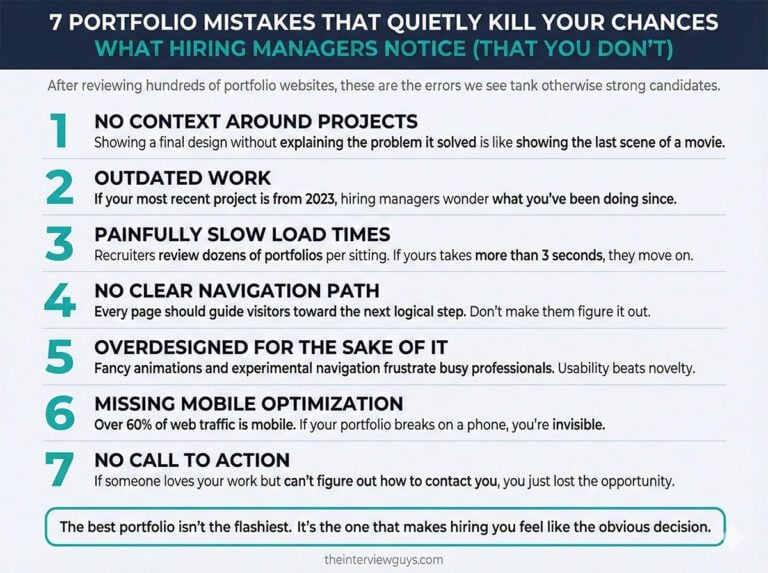
After reviewing hundreds of portfolio websites, these are the errors we see tank otherwise strong candidates:
- No context around projects. Dropping in a beautiful final design without explaining the problem it solved is like showing the last scene of a movie without the rest of the plot. Hiring managers need the full story.
- Outdated work. If your most recent project is from 2023, it raises immediate questions about what you’ve been doing since. Keep your portfolio current or remove the dates.
- Painfully slow load times. Recruiters review dozens of portfolios in a single sitting. If yours takes more than a few seconds to load, they’ll move on. Optimize your images and use a reliable hosting platform.
- No clear navigation path. Every page should guide visitors toward the next logical step. Viewed a project? Suggest another one. Read the About page? Point them to your contact form. Don’t make them figure out where to go.
- Trying to be too clever with design. Fancy animations, auto-playing music, and experimental navigation might showcase creativity, but they often frustrate busy professionals who just want to see your work. Usability always beats novelty.
- Missing mobile optimization. We already covered why this matters. If your portfolio breaks on a phone, you’re turning away more than half of potential visitors.
- No call to action. If a hiring manager loves your work but can’t easily figure out how to reach you, that enthusiasm dies fast. Make your contact information accessible from every single page.
Your Portfolio Website Is the Career Investment That Keeps Paying Off
Here’s the bottom line. In a job market where the average position attracts over 100 applicants, the candidates who get hired aren’t always the ones with the longest resumes or the fanciest credentials. They’re the ones who make it easiest for hiring managers to see their value.
Your portfolio website is how you do that.
You don’t need to be a designer or developer. You don’t need weeks of building time. And you definitely don’t need a big budget. Start by browsing Squarespace’s portfolio templates, pick one that fits your style, add your 3 to 5 strongest projects with context and results, write an About page that shows who you are, and make it dead simple for people to contact you.
Then put that URL on everything. Your resume. Your LinkedIn. Your email signature. Your cover letters. Every application you submit.
Because the next time a hiring manager Googles your name, you want them to find exactly what you want them to see. And that’s a story you get to write yourself.
In our experience helping over 100 million job seekers, the candidate with a professional website consistently stands out over equally qualified applicants who only submit a resume. That website is your unfair advantage…
200 Applicants Have Resumes. Only You Have a Website…
We recommend Squarespace because it gives you a professional online presence that makes you memorable. Choose from designer templates, customize without coding, and create a portfolio that actually gets you interviews. Free 14-day trial, and you can launch your site before other candidates finish tweaking their resume.

BY THE INTERVIEW GUYS (JEFF GILLIS & MIKE SIMPSON)
Mike Simpson: The authoritative voice on job interviews and careers, providing practical advice to job seekers around the world for over 12 years.
Jeff Gillis: The technical expert behind The Interview Guys, developing innovative tools and conducting deep research on hiring trends and the job market as a whole.