
Google UX Design Professional Certificate Review 2026: Can a $300 Course Actually Launch Your UX Career?
We talk to hiring managers every day who tell us the same thing: they have stacks of UX applicants who can name every step of the design thinking framework, but almost none of them can walk through a real design decision they made and explain why it worked.
Does the Google UX Design Professional Certificate fix that problem? Or is it just another badge for your LinkedIn profile that hiring managers scroll right past?
Here’s what we know. There are over 58,000 open UX design jobs in the U.S., with a median entry-level salary of $117,000 according to Lightcast job postings data. The certificate requires zero prior experience and costs $49 per month on Coursera. Most people finish in three to six months.
Quick takeaways from this review:
- Portfolio-first approach – You’ll build three complete projects that demonstrate actual design process, not just pretty mockups
- Figma fluency – The primary design tool taught is Figma, which appears in the vast majority of UX job postings we’ve analyzed
- Research methods gap – The user research training is foundational but won’t prepare you for advanced research roles
- No professional feedback – All work is peer-reviewed by other students, not working designers
- Affordable entry point – Total cost ranges from roughly $150 (fast track) to $300 (standard pace), compared to $4,000+ for bootcamps
- Google brand carries weight – It’s not a degree, but it signals commitment in a way that random Udemy courses don’t
Let’s break down exactly what a hiring manager thinks when they see this certificate on your resume.
☑️ Key Takeaways
- The Google UX Design Certificate builds a real portfolio with three end-to-end projects that give you something concrete to show hiring managers, not just a credential.
- Figma proficiency is the single most in-demand tool skill for UX designers in 2026, and this program teaches it from scratch.
- The certificate alone won’t get you hired, but combined with personal projects and networking, it creates a launchpad that career changers can actually use.
- At roughly $150 to $300 total, this program costs a fraction of UX bootcamps ($4,000+) while covering the same foundational material.
Disclosure: This article contains affiliate links. If you purchase through these links, we may earn a commission at no additional cost to you.
What an Interviewer Actually Thinks When They See This Certificate
First Thought: You’re Serious About the Career Change
When a hiring manager sees the Google UX Design Certificate on a career changer’s resume, the first reaction isn’t “wow, they’re qualified.” It’s “okay, this person invested real time into making this transition.”
That distinction matters more than you think. The UX field is flooded with applicants who watched a few YouTube tutorials, downloaded Figma, and declared themselves designers. The Google certificate signals that you went through a structured program, completed real projects, and stuck with it for months.
The Google brand helps here too. It’s not Harvard, but it’s not some random course mill either. Over 1.3 million people have enrolled in this program, and companies like Deloitte, Target, and Verizon have partnered with Google to hire certificate graduates through their employer consortium.
Second Thought: Can They Actually Design?
Here’s the hiring manager’s biggest fear: bringing on someone who memorized UX vocabulary but can’t actually solve a design problem.
We love this certificate because it forces you to build a portfolio. You don’t just learn about wireframing. You wireframe. You don’t just study usability testing. You plan a study, write a script, and analyze results. By the end, you have three complete case studies showing your process from research through final prototype.
That said, every project uses peer review rather than professional feedback. A hiring manager who digs into your portfolio might notice that your work hasn’t been critiqued by someone with industry experience. That’s a gap you’ll need to fill on your own.
The Technical Reality Check
What you’ll actually learn:
- Figma – The industry standard design tool. You’ll go from zero to building responsive prototypes. This is the single most valuable technical skill from the program, and it appears in nearly every UX job posting we’ve reviewed.
- User research fundamentals – Interview planning, usability studies, survey design, and synthesis. You’ll understand the research process, though not at the depth a dedicated UX researcher needs.
- Design thinking framework – Empathize, Define, Ideate, Prototype, Test. The full end-to-end process that structures how professional design teams work.
- Accessibility and inclusive design – WCAG guidelines and equity-focused design principles. This is increasingly important as companies face legal requirements for digital accessibility.
- Information architecture – How to structure content and navigation. A skill that separates thoughtful designers from people who just make things look pretty.
What you won’t master:
- Advanced prototyping – You’ll learn Figma basics, but complex interactions, animations, and micro-interactions aren’t deeply covered. Supplement with Figma community tutorials and YouTube channels like Figma’s official channel.
- Front-end development – No HTML, CSS, or JavaScript. Many UX job postings ask for at least basic coding awareness. Consider a free course like freeCodeCamp’s Responsive Web Design to fill this gap.
- Advanced user research – The research methods are introductory. If you want to specialize in UX research, you’ll need additional training in statistical analysis, A/B testing, and quantitative methods.
- Design systems at scale – You’ll learn about design systems conceptually, but building and maintaining enterprise-level component libraries requires deeper Figma expertise.
It’s not a degree. Don’t treat it like one. But as a foundation? It covers the core skills that entry-level UX designers need.
Interview Guys Tip: When a job posting says “Figma experience required,” they want to see that you can actually build in the tool, not just that you completed a course. After finishing the certificate, rebuild one of your portfolio projects from scratch with more complex interactions. That second pass shows growth and genuine tool mastery.
The Interview Red Flag This Certificate Helps You Avoid
The biggest interview killer we see? “I’m passionate about user experience and I love making things look beautiful.”
That’s code for “I don’t understand that UX is about solving problems, not decorating screens.”
The portfolio projects fix this. You complete three end-to-end design projects where you start with user research, define real problems, explore multiple solutions, and test your designs with actual users. When an interviewer asks “walk me through your process,” you have three concrete examples ready.
Here’s what a strong answer sounds like after completing this program:
“I was designing a mobile app for pet owners to find local veterinary services. Through user interviews, I discovered that the biggest pain point wasn’t finding vets. It was comparing prices and availability during emergencies. I pivoted my design to prioritize an emergency booking flow with transparent pricing. Usability testing showed that task completion for emergency bookings improved by 40% after I simplified the flow from five steps to three.”
That’s not memorized UX jargon. That’s a real design story with a measurable outcome.
Here’s what most people don’t realize: employers now expect multiple technical competencies, not just one specialization. The days of being “just a marketer” or “just an analyst” are over. You need AI skills, project management, data literacy, and more. Building that skill stack one $49 course at a time is expensive and slow. That’s why unlimited access makes sense:
Your Resume Needs Multiple Certificates. Here’s How to Get Them All…
We recommend Coursera Plus because it gives you unlimited access to 7,000+ courses and certificates from Google, IBM, Meta, and top universities. Build AI, data, marketing, and management skills for one annual fee. Free trial to start, and you can complete multiple certificates while others finish one.
The Deep Dive: What You’ll Actually Study
Phase 1: Foundations and Research (Courses 1-3)
What You’ll Master: How to think like a designer and understand users before you ever open Figma.
The first three courses build your UX vocabulary and research skills. You’ll learn what UX designers actually do day-to-day, how to conduct user interviews, create personas, write problem statements, and develop user journey maps. You’ll also cover design sprints and the ideation techniques that teams use to generate solutions.
This is where many career changers have their biggest “aha” moment. UX design isn’t about making things pretty. It’s about understanding human behavior and designing solutions that address real needs.
Key skills you’ll develop:
- User-centered design principles
- Conducting and synthesizing user interviews
- Creating personas and user journey maps
- Writing clear problem statements and hypothesis statements
- Competitive audits and market research
Interview Guys Tip: Don’t skip the research courses even if you’re eager to start designing. When hiring managers ask behavioral questions like “tell me about a time you advocated for the user,” your answer needs to demonstrate genuine research skills. The SOAR Method works perfectly here: describe the Situation (the project), the Obstacle (conflicting stakeholder opinions), the Action (your research findings), and the Result (how data changed the direction).
Phase 2: Design and Prototyping (Courses 4-5)
What You’ll Master: Wireframing, prototyping, and building in Figma.
This is where things get hands-on. You’ll learn to create paper wireframes, translate them into digital wireframes in Figma, and build interactive prototypes. Course 5 focuses specifically on responsive web design, teaching you how to adapt designs across mobile, tablet, and desktop.
The Figma training is solid for beginners. You’ll learn auto-layout, components, and basic prototyping interactions. By the end, you’ll be comfortable enough with the tool to build portfolio-quality mockups.
Critical operations you’ll practice:
- Paper and digital wireframing
- Low-fidelity and high-fidelity prototyping in Figma
- Responsive design across device sizes
- Design system basics and component creation
- Interactive prototype connections and transitions
One thing worth noting: the program recently shifted entirely to Figma after Adobe discontinued XD. This is actually a positive, because Figma dominates the job market. When we analyzed recent UX designer job postings, Figma appeared as a required or preferred tool far more than any alternative.
Interview Guys Tip: Bring your laptop to in-person interviews and be ready to open Figma. Some companies will ask you to do a live design exercise or walk through your file structure. Having organized, well-named layers and components shows professionalism that impresses even senior designers.
Phase 3: Research and Testing (Course 6)
What You’ll Master: How to plan usability studies and iterate based on real feedback.
This course teaches you to plan research studies, conduct usability tests, synthesize findings, and iterate on your designs. You’ll learn the difference between moderated and unmoderated testing, how to write effective test scripts, and how to identify patterns in user behavior.
The emphasis on iteration is important. Many new designers create one version of a design and call it done. This course trains you to see design as an ongoing process of testing, learning, and improving.
Key research skills:
- Planning moderated and unmoderated usability studies
- Writing effective research scripts and tasks
- Synthesizing research data into actionable insights
- Presenting findings to stakeholders
- Iterating designs based on evidence
Interview Guys Tip: If you can talk about a time you changed your design based on usability testing results, you’ll stand out from 90% of entry-level applicants. Hiring managers want to hear that you can handle feedback and let data drive decisions, not ego.
Phase 4: Portfolio and Job Prep (Course 7)
What You’ll Master: How to present your work professionally and leverage AI tools for your job search.
The final course pulls everything together. You’ll polish your three portfolio case studies, learn to present design work to stakeholders, and get guidance on building a UX portfolio website. Google recently added AI-powered job search content using Gemini and NotebookLM, which teaches you to use AI tools for resume building, application tracking, and interview preparation.
You’ll complete the full process:
- Assemble three end-to-end case studies for your portfolio
- Create a portfolio website or presentation deck
- Practice design critique and presentation skills
- Use AI tools for job search optimization
- Access Google’s employer consortium job board
This is arguably the most underrated part of the program. Many UX courses teach skills but leave you on your own when it comes to getting hired. Google’s job board connects you directly with 150+ employers who have agreed to consider certificate graduates.
Interview Guys Tip: Treat your portfolio case studies like consulting deliverables. Go beyond the course requirements. Add a “business impact” section to each project that quantifies how your design decisions could affect key metrics. For example: “Reducing the checkout flow from 7 steps to 4 could decrease cart abandonment by an estimated 15-20%.” Numbers sell. Always include numbers.
What Real People Say About This Certificate
Ilma Andrade, Career Changer > UX Designer
Ilma had no colleagues in the design field and no connections who could help her get hired. She started the Google UX Design Certificate in 2021 as a complete beginner, completing it in about three months of full-time study. A year later, she documented her journey of landing a UX design job on Medium.
Key takeaway: The certificate alone didn’t get her hired. Months of portfolio refinement, networking, and freelancing after completion made the difference.
Self-Taught Designer Fills Knowledge Gaps
A UI/UX designer with existing self-taught skills recently completed the certificate and shared their honest take on Medium’s Bootcamp publication. They noted that the portfolio projects were “gold” for beginners, creating case studies that show actual design process rather than random app screens. For them, the biggest value was filling gaps in formal research methods and connecting all the dots.
“The course made you build projects. For a beginner, this is gold. You end the certificate with a portfolio that isn’t just random app screens; it’s a collection of case studies that show your process.”
Key takeaway: Even designers with some existing experience found value in the structured research methodology and process-driven approach.
Junior Designers on DEV Community
Multiple junior designers on the DEV Community have noted that graduates who come in with this certificate and a solid portfolio “contribute from day one.” The structured approach to accessibility was highlighted as particularly valuable, giving new designers a framework that more experienced practitioners sometimes lack.
Key takeaway: The accessibility training is a genuine differentiator. Companies are increasingly prioritizing WCAG compliance, and having that knowledge from day one is a real advantage.
The Honest Truth: Pros and Cons
Pros
The portfolio changes everything. Three complete projects with full case studies. Not mockups. Not screenshots. Full design narratives showing research, ideation, prototyping, and testing. Most certificate programs hand you a PDF and wish you luck. This one hands you ammunition for job interviews.
Start your 7-day free trial on Coursera and see if this program fits your learning style before committing.
Figma training that matches market demand. We’ve reviewed hundreds of UX job postings, and Figma appears as a required or preferred tool in the vast majority of them. The program teaches Figma from absolute zero, which means career changers from non-technical backgrounds can develop genuine tool proficiency.
The price point is hard to beat. At $49 per month with a 7-day free trial, fast learners can complete the program for around $150. Even at the standard six-month pace, you’re looking at roughly $294. Compare that to General Assembly’s UX bootcamp at $4,500+ or a university program at $20,000+. For foundational skills, the value proposition is strong.
Google’s employer consortium opens doors. Upon completion, you can apply directly to jobs at 150+ partner companies including Deloitte, Target, and Verizon. This isn’t a guarantee, but it’s a pipeline that most certificate programs simply don’t offer.
75% of graduates report positive career outcomes. According to Google’s own survey data, three-quarters of certificate graduates reported a new job, promotion, or raise within six months of completion. Take self-reported data with appropriate skepticism, but the directional signal is positive.
Cons
No professional feedback on your work. This is the biggest weakness. All assignments are peer-reviewed by other students who are also beginners. Your case study might have fundamental UX problems that another beginner wouldn’t catch. If you’re serious about getting hired, find a mentor or join a UX community like ADPList where working designers offer free portfolio reviews.
The research training stays surface-level. You’ll learn the basics of user interviews and usability testing, but quantitative research, A/B testing, survey design methodology, and statistical analysis aren’t covered. If your target role involves “UX Researcher” in the title, this certificate is a starting point, not a finish line.
No coding exposure. Many UX job postings, especially at startups and smaller companies, expect designers to have at least basic HTML and CSS knowledge. Some ask for familiarity with developer handoff processes. The certificate doesn’t touch any of this.
The project prompts can feel artificial. Several reviewers, including a junior designer on Medium, noted that the design prompts generated by the Sharpen tool can feel disconnected from reality. Designing a “scheduling app for a Chinese restaurant in Melbourne” when you’re a career changer in Ohio makes the user research component feel forced. The workaround: choose a project topic you can actually research with real people in your network.
The UX job market is competitive. This needs to be said plainly. The UX field grew rapidly from 2018 to 2022, but the market has tightened significantly. Entry-level roles are harder to land than they were three years ago. A certificate gets your foot near the door. Actually walking through it requires a strong portfolio, networking, and often freelance or volunteer work to build real-world experience.
Interview Guys Tip: The biggest mistake certificate graduates make is applying to jobs the day they finish. Instead, spend two to four weeks after completion redesigning your weakest portfolio project. Use what you learned in the later courses to improve your earlier work. That iteration demonstrates growth, and hiring managers love seeing it.
The Verdict
| Criterion | Score |
|---|---|
| Curriculum Quality | 7.0 / 10 |
| Hiring Impact | 6.0 / 10 |
| Skill-to-Job Match | 7.0 / 10 |
| Value for Money | 9.0 / 10 |
| Portfolio and Interview Prep | 8.0 / 10 |
| Accessibility | 9.0 / 10 |
| Interview Guys Rating | 7.4 / 10 for career changers entering UX design |
| 8.2 / 10 for designers and creatives adding formal UX credentials |
Certificate: Google UX Design Professional Certificate
Difficulty: 1.5/5 (Beginner-friendly — zero prerequisites, though Figma has a learning curve for non-technical learners)
Time Investment: 6 months at 5–10 hours per week (faster for learners with any design or visual background)
Cost: $49/month | Typically $150–$300 total | Start your 7-day free trial
Best For: Career changers who need a structured, affordable path from zero to three portfolio case studies, and designers or creatives in adjacent fields (graphic design, marketing, content) who want to add formal UX process and research credentials to existing visual skills
Not Right For: Anyone targeting UX researcher specialist roles (research methods stay surface level), candidates who need live professional feedback and mentorship to stay accountable (all review is peer-based), or designers expecting the certificate alone to compete in a tight 2026 UX job market without significant supplemental portfolio work
Key Hiring Advantage: Three complete, process-driven case studies is the strongest portfolio output of any Google certificate in this series. Most UX applicants show polished mockups without research or testing. These case studies show the full process, which is what hiring managers at user-research-driven companies actually evaluate. The Google brand and employer consortium open doors, and the ACE approval for 10 college credits adds academic credibility. Figma training from scratch directly matches what appears in virtually every UX job posting.
The Brutal Truth: The UX job market tightened significantly after 2022, and this certificate reflects an older, more favorable market. Entry-level UX roles are genuinely harder to land than they were three years ago, and you’ll compete against candidates with bootcamp training, professional mentorship, and polished portfolios reviewed by working designers. The peer feedback model means your case studies may have undetected fundamental problems. Get your portfolio reviewed by a working designer on ADPList before applying anywhere. The certificate is a launchpad — but in today’s UX market, it requires more supplemental work than it did when the program launched.
Our Recommendation: Strong yes for the price, conditional on supplemental effort. At $150–$300 versus $4,500+ for bootcamps covering the same foundational ground, the value math is difficult to argue against. But budget an additional month after completion for portfolio polish, one real-world design project outside the program’s prompts, and professional portfolio feedback. Do those three things and you’re competitive. Skip them and the certificate alone won’t carry you.
Interview Guys Rating: 7.4/10 for career changers entering UX design | 8.2/10 for designers and creatives adding formal UX credentials
Career changers score lower because the tightened UX job market and peer-only feedback model create meaningful hurdles that require deliberate supplemental work to overcome. Designers and creatives with existing visual skills score higher because the UX process and research framework stacks directly on top of what they already know, making their portfolio output stronger and their hiring case more compelling.
Enroll and start your 7-day free trial on Coursera
What to Do After You Get Certified
The certificate is a foundation. Here’s how to build on it strategically.
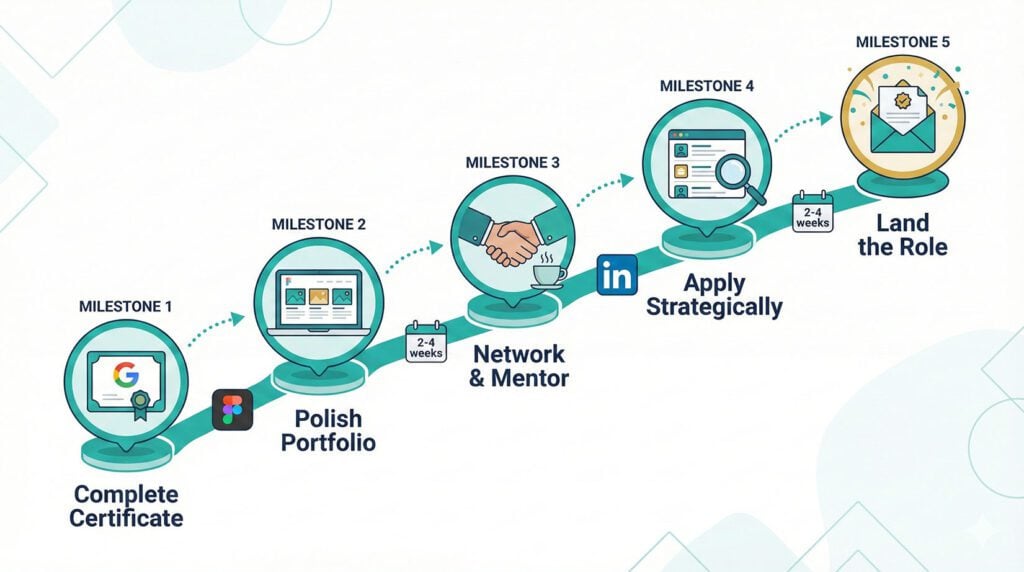
Week 1-2: Portfolio Polish. Revisit your three case studies. Strengthen the business impact sections. Make sure each project tells a clear story: problem, research, solution, testing, results. Host your portfolio on a clean, simple website. Squarespace, Wix, or even a well-structured Notion page works.
Week 3-4: Fill the Gaps. Pick one weakness to address. If it’s coding, do freeCodeCamp’s responsive web design module. If it’s advanced Figma, follow along with Figma community tutorials. If it’s research depth, take a free course on quantitative UX research.
Month 2: Build a Real Project. Find a local nonprofit, small business, or open-source project that needs design help. Doing real work for a real client, even unpaid, gives you stories that blow portfolio exercises out of the water in interviews.
Month 3: Network Strategically. Join ADPList for free mentorship from working designers. Attend local UX meetups. Start posting your design process on LinkedIn. The hidden job market is real in UX, and many entry-level roles are filled through referrals.
Ongoing: Keep Designing. The field moves fast. Follow design leaders on LinkedIn and Twitter. Stay current with Figma updates. Read Nielsen Norman Group articles weekly. The designers who get hired aren’t just certified. They’re curious, active, and constantly improving.
Frequently Asked Questions
Is the Google UX Design Certificate worth it in 2026?
Yes, especially for career changers and beginners. At roughly $150 to $300 total, it’s the most affordable structured path into UX design. The portfolio projects alone justify the investment. But understand that the certificate is a launchpad, not a landing pad. You’ll need to supplement it with personal projects, networking, and continuous learning.
How long does the Google UX Design Certificate take?
Google estimates six months at 10 hours per week. Many students complete it faster. Ilma Andrade finished in three months of full-time study. If you already have some design background, you could potentially move through the material in two to three months. The program is entirely self-paced.
Can I get a UX job with just this certificate?
You can, but it’s unlikely the certificate alone will do it. Most successful graduates combine the certificate with additional portfolio projects, freelance work, or volunteer design contributions. The certificate proves you have foundational skills. Your portfolio proves you can apply them. Networking and persistence get you in front of decision-makers.
How does this compare to UX bootcamps?
UX bootcamps like General Assembly ($4,500+) and Springboard ($7,900+) offer live instruction, professional mentorship, and career coaching that this certificate doesn’t. If you can afford a bootcamp and need that level of structure and accountability, it may be worth the investment. If budget is a concern, the Google certificate covers the same foundational material at a fraction of the cost. The main trade-off is professional feedback and career support.
Is Figma the right tool to learn in 2026?
Absolutely. Figma has become the dominant design tool for UX teams. It appears in more job postings than Sketch, Adobe XD (which has been discontinued), or any other design tool. Learning Figma through this program directly prepares you for what employers expect.
The Bottom Line
The Google UX Design Professional Certificate won’t hand you a job. No certificate does. But it gives you something that matters far more than a credential: a structured path from “I’m interested in UX” to “I can show you my work.”
The three portfolio projects are genuinely useful. The Figma training matches what the market demands. The price point makes it accessible to career changers who can’t afford $5,000+ bootcamps. And the Google brand, while not a golden ticket, signals seriousness to hiring managers who see hundreds of applications.
Here’s your action plan:
- Start the 7-day free trial and complete the first course to see if the format works for you
- Dedicate consistent weekly hours. Sporadic study leads to sporadic results.
- Choose project topics you can research with real people. Don’t rely solely on the random prompt generator.
- After completing the certificate, spend at least a month polishing your portfolio and building one additional real-world project
- Network from day one. Don’t wait until you’re “ready.”
The certificate proves you’re committed. The portfolio proves you can design. The real-world projects prove you can deliver. And persistent networking puts you in front of the people who are hiring.
That combination gets people hired. We’ve seen it work over and over.
If you’re ready to put in that work, start your free 7-day trial today and take the first step toward your new career in UX design.
Here’s what most people don’t realize: employers now expect multiple technical competencies, not just one specialization. The days of being “just a marketer” or “just an analyst” are over. You need AI skills, project management, data literacy, and more. Building that skill stack one $49 course at a time is expensive and slow. That’s why unlimited access makes sense:
Your Resume Needs Multiple Certificates. Here’s How to Get Them All…
We recommend Coursera Plus because it gives you unlimited access to 7,000+ courses and certificates from Google, IBM, Meta, and top universities. Build AI, data, marketing, and management skills for one annual fee. Free trial to start, and you can complete multiple certificates while others finish one.

BY THE INTERVIEW GUYS (JEFF GILLIS & MIKE SIMPSON)
Mike Simpson: The authoritative voice on job interviews and careers, providing practical advice to job seekers around the world for over 12 years.
Jeff Gillis: The technical expert behind The Interview Guys, developing innovative tools and conducting deep research on hiring trends and the job market as a whole.