
Is Jobscan Worth It in 2026? Honest Review, Pricing, and Who Should Skip It

We’ve tested dozens of ATS resume checkers over the years, and Jobscan is our top recommendation for most job seekers. But it’s not perfect, and it’s definitely not for everyone.
Nearly 99% of Fortune 500 companies use Applicant Tracking Systems to filter applications before human eyes ever see them. Your resume can be perfectly qualified and still get rejected because an ATS couldn’t read your formatting or match your keywords. This invisible barrier frustrates countless qualified candidates.
Jobscan addresses this problem by reverse-engineering how major ATS platforms work and showing you exactly what’s wrong. Users who implement its recommendations typically report higher callback rates. But at $49.95/month or $89.95 quarterly, you need to know if it’s actually worth the investment for your specific situation.
This honest review breaks down what Jobscan does well, where it falls short, who should pay for it, and who should look elsewhere.
What Is Jobscan and How Does It Work?
Jobscan is our recommended ATS resume checker because it accurately simulates how real applicant tracking systems process your application. The platform compares your resume against specific job descriptions and shows exactly where you’re falling short.
Here’s how it works:
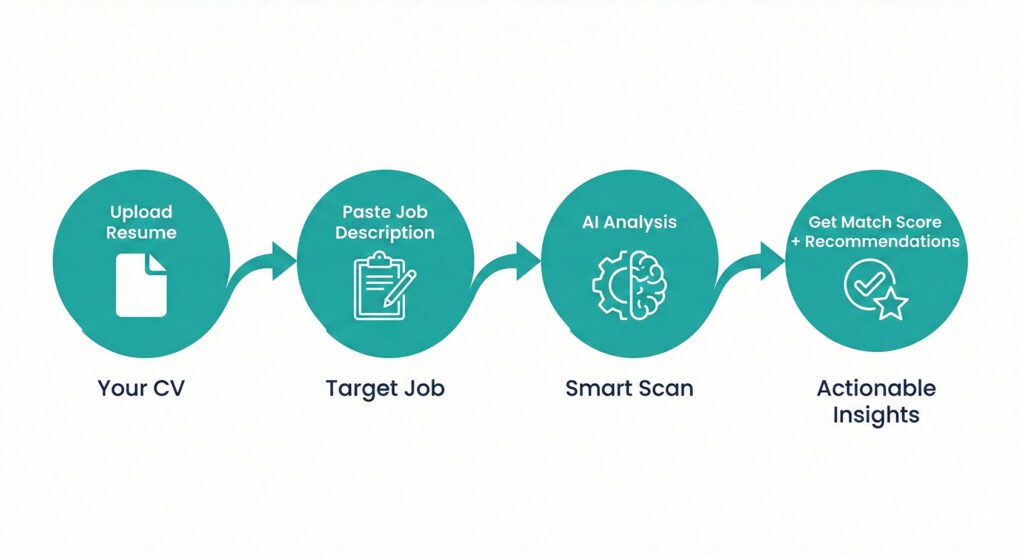
- Upload your resume and paste the target job description
- Jobscan’s AI scans both documents in seconds
- You receive a match rate score (0-100%) plus detailed feedback
- The report highlights missing keywords and formatting issues
- You get specific recommendations for improvement
What makes it different: The system reverse-engineers major ATS platforms like Taleo, Greenhouse, and Workday. It doesn’t just count keywords but understands context and variations. A 75% match rate or higher significantly increases your callback odds, though the real value is understanding what ATS systems actually prioritize.
Beyond resume scanning, the platform includes a resume builder, cover letter generator, LinkedIn optimizer, and job tracker. This all-in-one ecosystem is why we consistently recommend Jobscan over single-purpose alternatives.
Disclosure: This article contains affiliate links. If you purchase through these links, we may earn a commission at no additional cost to you.
Core Features That Make Jobscan Our Top Pick
Resume Scanner and Match Rate Analysis
The flagship feature analyzes 30+ parameters to assess resume-job fit. Why it’s valuable:
- Searchability checks: Contact info, job title, standard headers, education credentials
- Hard skills analysis: Highlights technical abilities missing from your resume
- Soft skills evaluation: Shows where to incorporate interpersonal qualities naturally
- Formatting check: Flags tables, images, complex layouts that break ATS parsing
- ATS detection: Identifies which specific system a company uses for targeted optimization
The formatting analysis alone justifies using Jobscan. Many beautifully designed resumes fail ATS screening because the systems literally can’t read them. Tables that look perfect in PDF get scrambled. Images become invisible. Headers get ignored.
AI-Powered Resume and Cover Letter Generation
Premium users get One-Click Optimize using GPT-4 technology to automatically rewrite content. The time savings are significant:
- Analyzes your resume and job description simultaneously
- Generates revised versions incorporating missing keywords
- Maintains natural-sounding language and proper formatting
- Reduces customization time from 20-30 minutes to under 5 minutes
The AI produces strong first drafts but requires your review. It occasionally creates generic phrasing or slightly exaggerates accomplishments. Think of it as a powerful starting point, not a finished product.
The cover letter generator follows the same approach, creating customized letters based on your resume and target role. For job seekers who struggle with cover letter writing, this feature alone can justify the subscription. Our guide on how to write a cover letter provides complementary strategies.
LinkedIn Profile Optimization
The LinkedIn optimizer uses similar keyword matching technology to strengthen your profile. Why this matters:
- 78% of companies actively recruit through LinkedIn
- Many recruiters search LinkedIn directly rather than reviewing applications
- Your profile needs consistent messaging with your resume
The tool compares your profile against target jobs and identifies gaps in your headline, summary, experience descriptions, and skills sections. It provides specific recommendations for each section to improve recruiter visibility.
Resume Builder with ATS-Friendly Templates
Nine professionally designed templates prioritize ATS compatibility over aesthetics. Key advantages:
- Clean, single-column layouts with standard fonts
- Unlimited downloads on the free plan
- Upload existing resume or import from LinkedIn
- Helpful prompts for each section
The templates won’t win design awards because they’re intentionally plain. That’s what works for ATS. If you’re in creative fields, create a separate “human-friendly” version for networking and portfolio presentations.
Pricing: What You Get at Each Level
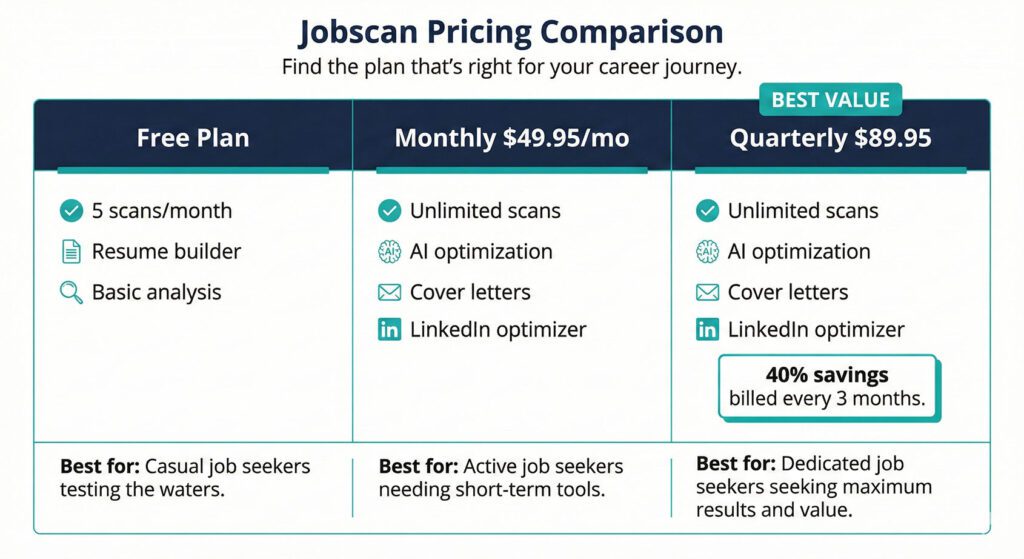
Free Plan:
- 5 resume scans per month
- Resume builder with unlimited downloads
- Basic match rate analysis and keyword suggestions
- Best for: Selective job seekers applying to 5-10 carefully chosen roles monthly
Monthly Plan ($49.95/month):
- Unlimited resume scans
- One-Click AI Optimization
- Cover letter generator
- LinkedIn profile optimizer
- Full job tracker access
- Best for: Short-term, intensive job searches
Quarterly Plan ($89.95/quarter = $29.98/month):
- All monthly features at 40% savings
- Best for: Realistic job searches (average 68.5 days in 2026)
- Three-month commitment upfront but better value
Our recommendation: Start with the free plan to learn ATS principles. If you’re actively applying to multiple jobs weekly, upgrade to quarterly for the best value. The time savings and increased interview rates justify the investment for serious job seekers.
Why We Still Recommend Jobscan Despite the Trade-Offs
Accurate ATS Simulation (When It Matters)
Jobscan’s core strength is its precise simulation of how real ATS systems work. The platform has reverse-engineered algorithms from major providers including Taleo, Greenhouse, Workday, and iCIMS.
The formatting analysis catches real problems:
- Tables that look fine in PDF but get parsed incorrectly
- Images and graphics that become completely invisible to ATS
- Headers and footers that get scrambled or ignored
- Non-standard section titles that confuse systems
Users consistently report increased response rates after implementing formatting recommendations. This proves the tool identifies genuine technical barriers.
The caveat: This matters primarily for corporate positions at large companies. Small businesses and startups often don’t use ATS at all, making this analysis less relevant.
The keyword matching understands context and variations. It recognizes that “project management” and “managed projects” carry similar weight. But it also can’t distinguish between truly important keywords and nice-to-have fluff in bloated job descriptions.
Educational Value That Lasts
Even if you only use the free trial, Jobscan teaches you fundamental ATS principles that improve all future applications. The detailed explanations help you understand not just what to change but why it matters.
You learn to think like an ATS algorithm, recognize important keywords in job descriptions, and understand formatting pitfalls. This knowledge persists after you cancel.
That said, the learning curve takes time. New users often make mistakes like blindly accepting AI suggestions or over-optimizing for match rates at the expense of readability.
For strategies on maximizing your resume content beyond just ATS optimization, our top resume tips for 2025 guide offers complementary advice.
Comprehensive Ecosystem (With Usability Issues)
Unlike single-purpose tools, Jobscan combines resume optimization, cover letter creation, LinkedIn improvement, and job tracking in one platform. This integration reduces tool fatigue and ensures consistency.
Recruiters who review your resume then check your LinkedIn expect aligned messaging. Jobscan maintains that consistency automatically.
The downside: The interface isn’t particularly intuitive. Navigation between tools requires more clicks than necessary. Loading times for AI features can be slow when batch-processing applications. The job tracker lacks advanced features like automated follow-ups that dedicated tools offer.
The all-in-one approach is convenient but not best-in-class for every component.
Interview Guys Tip: The LinkedIn optimizer is one of Jobscan’s most underutilized features. Many companies now recruit directly through LinkedIn rather than job boards. An optimized profile increases your discoverability for passive recruiting opportunities with less competition than active job postings.
Real Trade-Offs You Should Consider
Price Is Actually a Significant Barrier
Let’s be direct: at $49.95/month or $89.95/quarter, Jobscan is expensive for someone who’s already between jobs and managing a tight budget. Competitors like Teal ($10-20/month) and ResumeWorded ($19/month) offer similar core ATS checking at a fraction of the cost.
The quarterly plan at $29.98/month is more reasonable, but you’re committing $90 upfront. If you land a job in week three, you’ve paid for features you won’t use. There are no pro-rated refunds.
For the price premium, you’re getting more comprehensive formatting analysis, better ATS detection, and the full ecosystem (cover letters, LinkedIn, job tracking). Whether those extras justify doubling or tripling your monthly cost depends on your specific needs and budget constraints.
The free plan’s 5 scans fills up fast if you’re actively applying. Many users burn through their monthly limit in the first week, then face the decision to upgrade or abandon the platform.
Match Rate Can Become an Unhealthy Obsession
The match rate percentage looks scientific and objective, which makes it dangerously easy to fixate on. We’ve seen job seekers spend hours trying to hit 95% when a 75% match is perfectly adequate.
The reality is that different ATS systems weight keywords differently. Some roles genuinely don’t need every keyword mentioned in bloated job descriptions. And ultimately, human recruiters make hiring decisions based on far more than keyword density.
The tool can encourage keyword stuffing if you’re not disciplined. Adding “team player” and “strong communicator” seventeen times just to boost your score makes your resume sound robotic. Natural language and compelling achievement stories often matter more than hitting every possible keyword variation.
AI Content Quality Is Inconsistent
The One-Click Optimize feature saves time but produces first drafts that need substantial editing. Sometimes the AI generates genuinely awkward phrasing or uses overly generic language that weakens your original content.
We’ve seen cases where strong, specific achievement statements got replaced with bland corporate-speak just because it incorporated more keywords. The AI excels at keyword incorporation but sometimes sacrifices impact and authenticity.
You absolutely need strong resume writing skills to use this tool effectively. It’s not a magic solution for people who struggle with articulating achievements. For foundational guidance, check out how to write a resume with no experience to build core skills first.
Limited Customization for Specialized Fields
Jobscan applies a fairly one-size-fits-all approach. A software engineer, marketing manager, and construction supervisor all receive essentially the same type of feedback focused on keywords and formatting.
Different industries have different resume conventions. Creative fields value portfolio links and design elements that ATS optimization actively discourages. Academic positions require CVs with publication lists and research descriptions that don’t fit standard structures. Federal resumes have completely different requirements that Jobscan doesn’t address well.
If you’re in a specialized field, the generic advice might actually hurt more than help.
The Learning Curve Takes Time
Despite marketing that suggests it’s simple, effectively using Jobscan requires understanding nuance. You need to know which recommendations to follow, which to adapt, and which to ignore for your specific situation.
The interface isn’t particularly intuitive. Navigation between tools requires more clicks than necessary. Loading times for AI features can be slow when you’re batch-processing applications.
New users often make mistakes like blindly accepting AI suggestions or over-optimizing for match rates at the expense of readability.
Interview Guys Tip: Don’t just chase the highest match rate on every application. We’ve seen 85% matches get interviews while 98% matches get rejected. Focus on incorporating genuinely relevant keywords naturally while maintaining your authentic voice and strong achievement descriptions.
Who Should Pay for Jobscan (And Who Shouldn’t)
Best Candidates for Premium Subscription
Active job searchers (10+ applications weekly) applying to large companies with strict ATS get the most value. If you’re dedicating full-time effort and applying to Fortune 500s or major corporations, the quarterly plan at $29.98/month delivers solid ROI.
Career transitioners repositioning for new industries benefit from understanding exactly which keywords matter in their target field. The tool helps identify transferable skills and articulate them in industry-relevant language.
Job seekers with strong qualifications but zero callbacks likely face ATS compatibility issues rather than qualification problems. Jobscan systematically fixes these technical barriers.
Who Should Stick with the Free Plan
Selective job seekers (5-10 applications monthly) can accomplish their goals with free scans. Strategic targeting over volume makes the 5-scan limit sufficient.
Anyone already getting 20-30% callback rates doesn’t need more optimization. You’ve cleared the ATS hurdle. Focus resources on interview preparation instead.
Who Should Look Elsewhere Entirely
Creative professionals (designers, writers, artists) where portfolio quality and creative work samples matter more than keyword optimization. ATS advice often conflicts with what actually gets you hired in creative fields.
Academic job seekers needing CVs with publications, research descriptions, and teaching statements. Jobscan doesn’t understand academic conventions and will give you bad advice.
Federal job applicants with completely different resume requirements (USAJobs format, KSAs, etc.). Jobscan isn’t built for federal applications.
People applying primarily to small businesses and startups that may not even use ATS. Your time is better spent networking and reaching hiring managers directly.
Those who struggle with basic resume writing should invest in professional resume writing services first. Jobscan optimizes existing content but can’t create compelling achievement stories from scratch.
Consider Cheaper Alternatives First
Teal ($10-20/month) offers solid ATS optimization, job tracking, and application management at half the price. The keyword analysis is comparable for most users.
ResumeWorded ($19/month) provides keyword matching and formatting checks that cover 80% of what most people need from Jobscan.
ChatGPT Plus ($20/month) can handle resume optimization with proper prompting, though you lose the systematic formatting analysis and ATS-specific detection.
If you try these and find you need more comprehensive features, then Jobscan makes sense. But many job seekers don’t actually need the premium tier.
Real Results from Real Users
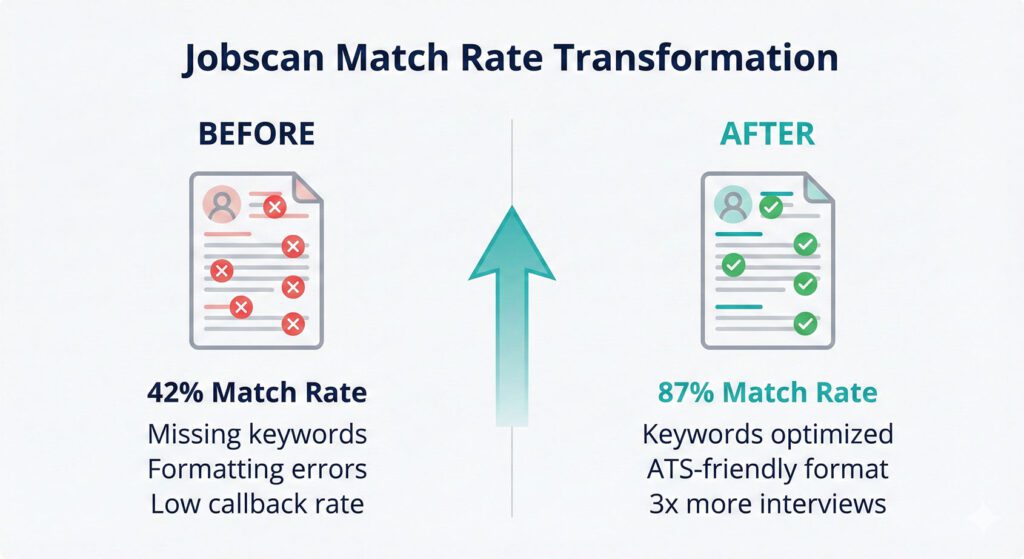
User testimonials consistently show dramatic improvements after implementing Jobscan’s recommendations. The company reports users get 3x more job interviews, with patterns verified across independent reviews.
One Sitejabber review documented receiving only 1 interview from 250 applications over two years without Jobscan. After subscribing, they received 5 interviews from 12 applications in three months and landed a job. Similar patterns appear across user reviews on Trustpilot and Capterra.
Critical caveat: Results depend entirely on implementation. Simply viewing the report changes nothing. You must actually apply recommendations, incorporate keywords thoughtfully, fix formatting issues, and continue customizing for each application.
The tool identifies problems and provides solutions, but execution remains your responsibility. Jobscan optimizes what you give it rather than creating strength from weakness. For foundational skills, check out how to write a resume with no experience.
Independent testing by career counselors validates the core functionality. The formatting analysis catches genuine ATS parsing errors. The keyword identification aligns with what recruiting professionals actually search for. Match rate scores provide useful directional guidance even if not perfectly scientific.
How to Maximize Your Jobscan Investment
Strategic usage tips:
- Prioritize natural language over perfect scores – An 85% match with strong content beats a 98% match with awkward phrasing
- Customize AI suggestions – Use One-Click Optimize as a starting point, then refine for authenticity
- Learn the patterns – Pay attention to consistent recommendations across applications to internalize ATS principles
- Focus on important keywords – Hard skills and specific technical competencies matter more than generic soft skills like “team player”
- Batch your work – Use the Chrome extension to save multiple jobs, then optimize in focused sessions
For advanced strategies on tailoring applications effectively, see our comprehensive guide to ATS resume optimization.
Interview Guys Tip: Use the 2-week free trial strategically even if you don’t plan to subscribe long-term. Optimize resumes for multiple roles, generate cover letters, improve your LinkedIn profile, and download everything. You’ll learn valuable ATS principles that improve all future applications.
Our Final Verdict: Recommended with Reservations
Jobscan is our top recommendation for ATS resume optimization, but that recommendation comes with important caveats. It’s the most accurate and comprehensive tool we’ve tested, but it’s not right for everyone, and the price gives us pause.
When Jobscan Is Worth Every Penny
The tool delivers genuine value for active job seekers applying to large corporations with strict ATS requirements. If you’re targeting Fortune 500s, submitting 10+ applications weekly, and have budget flexibility, the quarterly plan at $29.98/month represents solid value.
The 3x increase in interview rates reported by users holds up in independent reviews when people actually implement the recommendations. The formatting analysis catches real technical barriers that qualified candidates don’t even know exist.
For career transitioners, the keyword guidance is particularly valuable. Understanding exactly which terms matter in your target industry accelerates the pivot significantly.
When You Should Look Elsewhere
If you’re on a tight budget between jobs, start with free alternatives. Teal, ResumeWorded, and ChatGPT can handle 70-80% of what Jobscan does at a fraction of the cost. Only upgrade if you hit clear limitations.
If you’re in creative, academic, or federal positions, Jobscan’s generic approach may do more harm than good. The advice conflicts with what actually works in specialized fields.
If you’re already getting solid callback rates (20%+), you don’t need this. Your resume is working. Focus on interview skills instead.
The Honest Bottom Line
Jobscan is expensive, has a learning curve, and isn’t perfect. The AI content needs editing. The match rate scores can become an unhealthy obsession. The one-size-fits-all approach doesn’t work for everyone.
But for its core audience applying to ATS-heavy corporate positions, it’s the most effective tool available. The comprehensive feature set, accurate simulation of real ATS systems, and educational value justify the premium over cheaper alternatives.
Our recommendation: Start with the free plan. Use it strategically for your top-priority applications. If you find yourself hitting the 5-scan limit quickly and genuinely applying the insights to improve your callbacks, upgrade to quarterly.
If the free plan meets your needs, great. You’ve saved money. If you realize you need unlimited scans and AI features, you’re making an informed investment rather than a blind purchase.
Realistic Expectations
Jobscan is a tool that amplifies your effort, not a magic solution. It identifies what’s wrong and shows you how to fix it, but execution remains your responsibility. It can’t compensate for lack of genuine qualifications or weak experience descriptions.
Use it as one component of a comprehensive job search that includes networking, skill development, and strategic targeting. The platform works best when combined with the fundamentals, not as a replacement for them.
For serious job seekers facing ATS barriers at large companies, Jobscan is worth the investment. For everyone else, proceed thoughtfully and consider alternatives first.
Interview Guys Tip: Use the 2-week free trial strategically even if you’re unsure about subscribing. Optimize resumes for multiple roles, generate cover letters, improve your LinkedIn profile, and download everything. Cancel before billing starts. You’ll have learned valuable ATS principles that improve all future applications without spending anything.
Advice like this is the general version. Longbow scores your actual resume against the actual job you want and shows you what's missing, before the filters decide for you. Here's why we built it.

ABOUT THE INTERVIEW GUYS (JEFF GILLIS & MIKE SIMPSON)
Mike Simpson: Co-founder of The Interview Guys and Longbow. He has been the voice behind our interview advice since 2013 — his work has reached over 100 million job seekers around the world. The strategic mind behind Longbow, our new career platform.
Jeff Gillis: Co-founder of The Interview Guys and Longbow. He built the systems that put our work in front of those readers, and he leads the engineering on Longbow, the cutting edge career platform built for today’s job seeker.